

1-Visitor
November 15, 2016
Question

1. Complex numbers 2. The limit operator

  • November 15, 2016
  • 14 replies
  • 4892 views

Hi,

I've encountered some issues in Mathcad 15 when dealing

with

1. Complex numbers

2. The limit operator (two-sided)

Here are two simple examples :
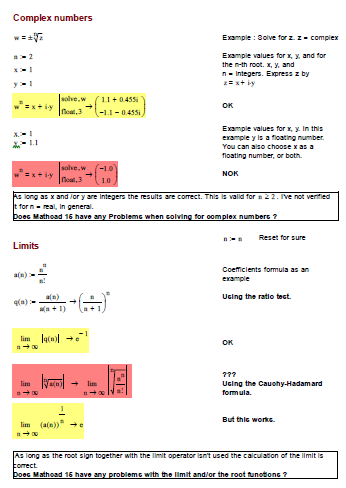
Complex-Limit-Questions.png

Does anybody in the community has also encountered such problems in Mathcad 15 ?

Please let me know.

Thanks.

Greetings

14 replies

21-Topaz II
November 15, 2016

Hi hfeith

I'm sorry, but the image is almost unreadable, it is too small.

hfeith1-VisitorAuthor
1-Visitor
November 15, 2016

Sorry F. M. ...

Now I attached a pdf. Hope that makes it more readable.

25-Diamond I
November 15, 2016

You sure have found some bugs which at least to me are new.

The first one seems to have to do with the (nasty) effect that Mathcads symbolics switch to float mode whenever a floating point number is in use. Changing 1.1 to 11/10 provides a correct solution.

Be aware that using the float command in symbolic evaluation affects the whole  calculation, not just the display of the result. Another nasty "feature" of Mathcads symbolics.

I am not sure how this bug is related to complex numbers but I guess it has nothing to do with complex numbers, even though I could not duplicate a similar effect without complex numbers so far.

Another oddity I found while playing around is the error we get when the float command is placed above the solve command. Have no explanation for this.

The second effect that Mathcad is not able to simply some expressions did not surprise me as I know, that Mathcads symbolics is rather weak.

Mathcad used to use Maple for symbolic calculations, but since Version 14 Maple was replaced by Mupad which seems to be a not so good substitute. I guess we would get better results using Mathcad 11 😞

What really surprised me that I could not duplicate your results with my Mathcad 15 M045 which is the latest release.

I got different looking results, had to use the "simplify" modifier where you seem to get the result without (I assume you did not hide the keywords) and I was not able to get the result e^-1 which you got without effort.

Which maintenance release of Mathcad 15 are you using?

Had PTC broken the symbolics with the new maintenance release(s) ???

25-Diamond I
November 15, 2016

Here are some more attempts which show that is has to do with the floating point number.

On the other hand, it may have to do with the imaginary unit, too. I can't tell.

21-Topaz II
November 16, 2016

potenza nma di w complex.jpg

25-Diamond I
November 16, 2016

Yes, as long as n is undefined we even get the result without using modifiers (complex is default in muPad)

We can slightly streamline the answer by telling MC that n should be an integer

and of course we get a better readable result if we avoid float mode

BUT the wrong result which hfeith found out, occurs, when n is set to a specific number, e.g. 2 AND forcing muPad into float mode by using a float for x or y.

Here the modifier "assume, w=complex" which you seem to suggest with your answer, does not help either:

Its a mathematically absolute wrong result and so I consider it a severe bug.

Werner

21-Topaz II
November 16, 2016

The results that I  show here thereafter, however, are a little more comforting .... In short, mathcad .... is not so bad to throw away!

conforting results.jpg

21-Topaz II
November 17, 2016

Hi,

I would suggest you to visit this page https://www.ptcusercommunity.com/groups/mathcad-paradoxes

hfeith1-VisitorAuthor
1-Visitor
November 17, 2016

Interesting link ! Thank's F.M.