A different set of input variables depending on a logical switch (MathCAD 15)
Hi everyone
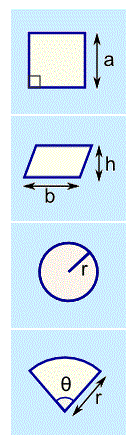
I am trying to automate a task, where the user has to select a sketch (that will be graphically shown using a GIF-Image stored somewhere), then provide certain inputs (namely dimensions) that will be shown on the sketch and then my worksheet will compute the results.
To provide an example, I could say:
Sketch:= Square / Rectangle / Circle
for "Square" the input variable could be: a (the side of the square)
for "Rectangle" the input variables could be: a,b (the two sides of the rectangle)
for "Circle" the input variable could be: r (the radius).
then MathCAD would take the input variable(s) and compute, as an example, the perimeter and the area.
The computation is no problem at all, I can manage it with some ifs. But the input variables, I do not know how to "force" the user to input all and only the variables that are needed for the chosen sketch (the number of this variables is around 8-10 in my real application, the geometrical sketches being slightly more complex than square and circles).
At the moment I have no better idea than to provide a group of input statements for every sketch, all inside the same worksheet, all deactivated, and tell the user to manually activate the group of inputs he needs.
Like:
Inputs for "square"
a:= 30 mm
Inputs for "rectangle"
a:= 40 mm
b:= 50 mm
Inputs for "circle"
r:=20 mm
Somehow this method is not user-friendly at all, and not satisfying.
For information,this question is related to this other one.
Thanks a lot for every insight or idea!
Best regards
Claudio
PS: the sketches could look like this (only the appropriate one will be shown):