
21-Topaz II
September 26, 2018
Question

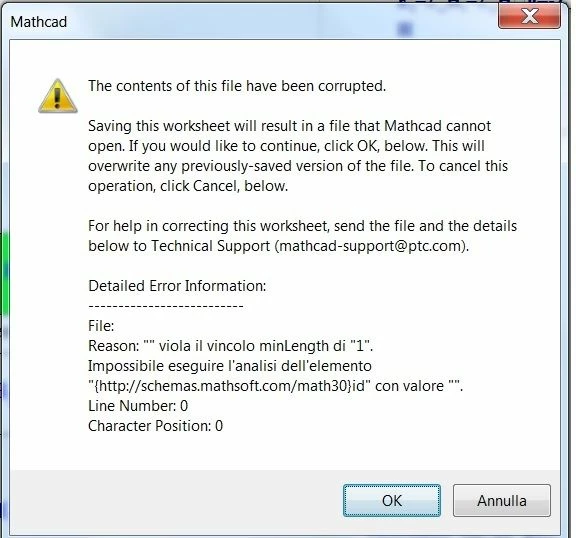
A horrible message .....

  • September 26, 2018
  • 2 replies
  • 3405 views

Hi All,

I have created, for a long time, a file that has grown more and more. Currently the size is 19MB.

For some time, when I save it, I find the attached deadly message ...... If I save the file it will reset 0MB ..... How to determine the cause?

Thank you.
errore 26092018.jpg

This topic has been closed for replies.

2 replies

23-Emerald IV
September 26, 2018

It's PTC's problem, let them solve it, use the mail to support and maybe they will help you.

If you cannot send them the file, you'll have to dig into the file yourself. Note that a Prime sheet file is in fact an archive.

If you (use windows file explorere to) copy it to another file with extension .zip, you'll be able to open it and see what's inside.

One of the contained files is an xml file that holds the actual worksheet contents. That's where the digging starts...

All this is hopeless if you only have a .mcdx sheet file of 0 MB (or GB or whatever) because then your sheet is really lost. So I hope you have a backup..


Success!

Luc

-MFra-21-Topaz IIAuthor
21-Topaz II
September 26, 2018

I'm sorry, the file was made with Mahcad 15. And then, I should send all my work to who knows who?

23-Emerald IV
September 26, 2018

That's what I said... If you cannot (or want not) send your file to support, you have to dig yourself.

A mathcad 15 file is (also) an XML file. Delete the second half of the file and see if that leaves you with a well-behaving first half. If it does, repeat with the last quarter..... etc. Until you pinpoint a small enough fraction that you can delete and later repair.


Success!
Luc

-MFra-21-Topaz IIAuthor
21-Topaz II
September 29, 2018

Hi All,

The cause of this horrible message, perhaps, is the presence in the main and in some reference files of definitions of indices and variables with the same names even if different definition intervals.