
8-Gravel
May 4, 2025
Solved

About Plotting in Mathcad Prime 9

  • May 4, 2025
  • 2 replies
  • 1206 views

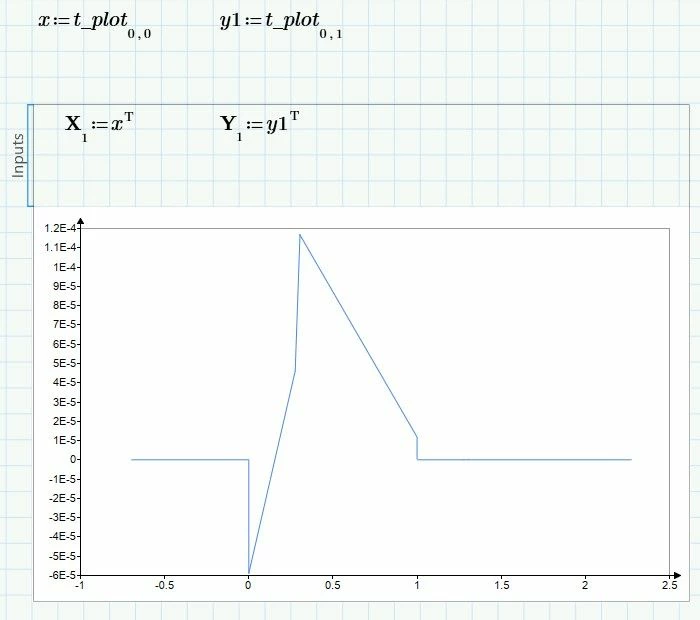
first time posting a question and I lack experience about using Mathcad Prime 9.I was trying to realize what I have done in MATLAB by using Mathcad prime 9. After judging the working range(time) , and calculating the corresponding currents, I hope to plot the result on a 2D sheet but find no solutions.
Best answer by terryhendicott

Hi

Two methods are available Plot component or from the plot menu.

Capture3.JPG

2 replies

21-Topaz II
May 5, 2025

Hi

Two methods are available Plot component or from the plot menu.

Capture3.JPG

DDHH20018-GravelAuthor
8-Gravel
May 5, 2025

THANKS A LOT! I see where my problem is. I didnt know the subscript tells the information of the matrix. I was trying to use "[ ]" to quote, just like in matlab.
Many thanks again!

25-Diamond I
May 5, 2025

In Prime you can plot one vector over another, but Prime only understands a vector to be a column vector, not a row vector.

Your function "calculate" returns five row vectors.

So I would suggest to use the transpose operator already at the end of function "calculate" so it returns column vectors and you also may assign the result of this function to a 1x5 matrix of meaningful variable (names) so you don't have to manipulate the result variable "plott" to access the individual vectors for plotting.

Werner_E_0-1746435400328.png


Prime 9 sheet attached


BTW, one of the strengths of Prime is that you can use units in a natural way so I would suggest that you add units to your calculations right from the start.


EDIT: I overlooked that in case 1 and 2 you only return two vectors and not five.

One way to cope with that could be a small program which replaces the non-existent vectors by zeros. That way they only show as a tiny dot at the left of the plot. We could replace the zero by a NaN, but this would result in a nasty red error in case 1 & 2.

Of course you could also already modify your function "calculate" so that it returns a 5x1 nested matrix in all cases.

Werner_E_0-1746436591270.png

Modified Prime 9 sheet attached


DDHH20018-GravelAuthor
8-Gravel
May 5, 2025

Many thanks to you! I would refine my file again based on your modification. You really help me a lot. The "overlook" you pointed out is exactly what I am trying to fix. Thank you again for your meticulous answer!