10-Marble
February 2, 2023
Question

Aligning equations ?

  • February 2, 2023
  • 3 replies
  • 4776 views

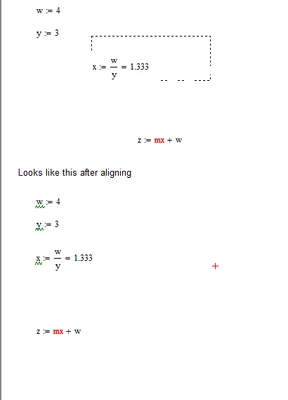
In Mathcad 15, if you have equations scatter along the sheet you can highlight, go to format, and the select align regions from the drop menu. How do you do that in Mathcad prime 8 ?

Capture.PNGraevfebv.PNG


3 replies

ttokoro
21-Topaz I
21-Topaz I
February 2, 2023

Only move items one by one.

t.t.
25-Diamond I
February 3, 2023

The developers of Prime have apparently found that arranging regions individually just by eye, possibly using the grid, has to suffice.
Stupid, ignorant, but unfortunately a fact.
This is, regretfully, by far not the only thing to find fault with the Prime disaster software.

21-Topaz II
February 3, 2023

Hi,

This has been requested in Mathcad Ideas.

Search for "Mathcad Prime : Please add alignment tools"

Posting currently has 12 votes so I recommend you go to the ideas page, search for the posting and vote for it.


Cheers

Terry

25-Diamond I
February 3, 2023

@terryhendicott wrote:

Hi,

This has been requested in Mathcad Ideas.

Search for "Mathcad Prime : Please add alignment tools"

Posting currently has 12 votes so I recommend you go to the ideas page, search for the posting and vote for it.


Cheers

Terry


Having followed the so-called "development" of Prime from the beginning, I have come to the conclusion that this "ideas" section is merely a placebo for paying customers. If PTC were really serious about wanting to improve the software, development would look significantly different and there would also be an easy way open to all users to report bugs and suggest improvements.

1-Visitor
January 31, 2024

Although I very much miss the align regions buttons in Mathcad 15, my workaround is to select equations and move them using the arrow buttons.  In that way, the regions can be easily and accurately brought into alignment. Unfortunately, this has to be done one equation at a time.