1-Visitor
November 24, 2016
Solved

altering units in worksheet

Could some kind and gentile soul explain to me (one more time) the ins and outs of units, altering default units in a particular worksheet and/or setting preferred units in Mathcad prime 3.0

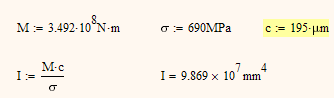
My calculations don't come out right or they don't look right (WYSIWYG) for the human eye. I have problems with the definition of inertia. I attached some offending parts from my main calculation file.


Thanks maurits

Werner_E
Werner_EAnswer
25-Diamond I
November 25, 2016

Obviously you will have to provide the proper unit for c (195).

Not sure, but could it be that you are looking for something like this:

2 replies

Werner_E
Werner_E25-Diamond IAnswer
25-Diamond I
November 25, 2016

Obviously you will have to provide the proper unit for c (195).

Not sure, but could it be that you are looking for something like this:

Translate
1-Visitor
November 25, 2016

Now Mathcad knows what to do but the untrained human reading these lines does not. I suppose I could circumvent this by adding a little textbox explaining to the reader what unit 195 μm really stands for.


I would like to be able to script a specific worksheet. So that "195" or "195mm" automatically puts out the right form and the correct numbers. Can I add a script somewhere for let's say "I-angular.momentum" so Mathcad knows I want kg.m2? And "Ï-surface.momentum" which would produce mm4?


Options in the upper left corner don't seem to let me do just that. How would I script Mathcad?

Translate