10-Marble
May 17, 2017
Solved

Are Prime 4 worksheet add-ons used like MC 15 ebooks?

  • May 17, 2017
  • 4 replies
  • 12678 views

When I got Prime 4 I also bought one of the worksheet add-ons, but cannot find a way to access them within the program other than directly opening the document like I would a file I'm working on. Is there ebook functionality to the use of worksheets like there is in MC 15 where they are part of the help system and may be viewed alongside your working document in a separate window? Or capability close to this? If not, what is the intended approach for their use? (I'm use to MC v14 handbooks and quicksheets and wondering if that functionality is reproduced in any fashion in Prime 4).

TIA

David

Best answer by David_A

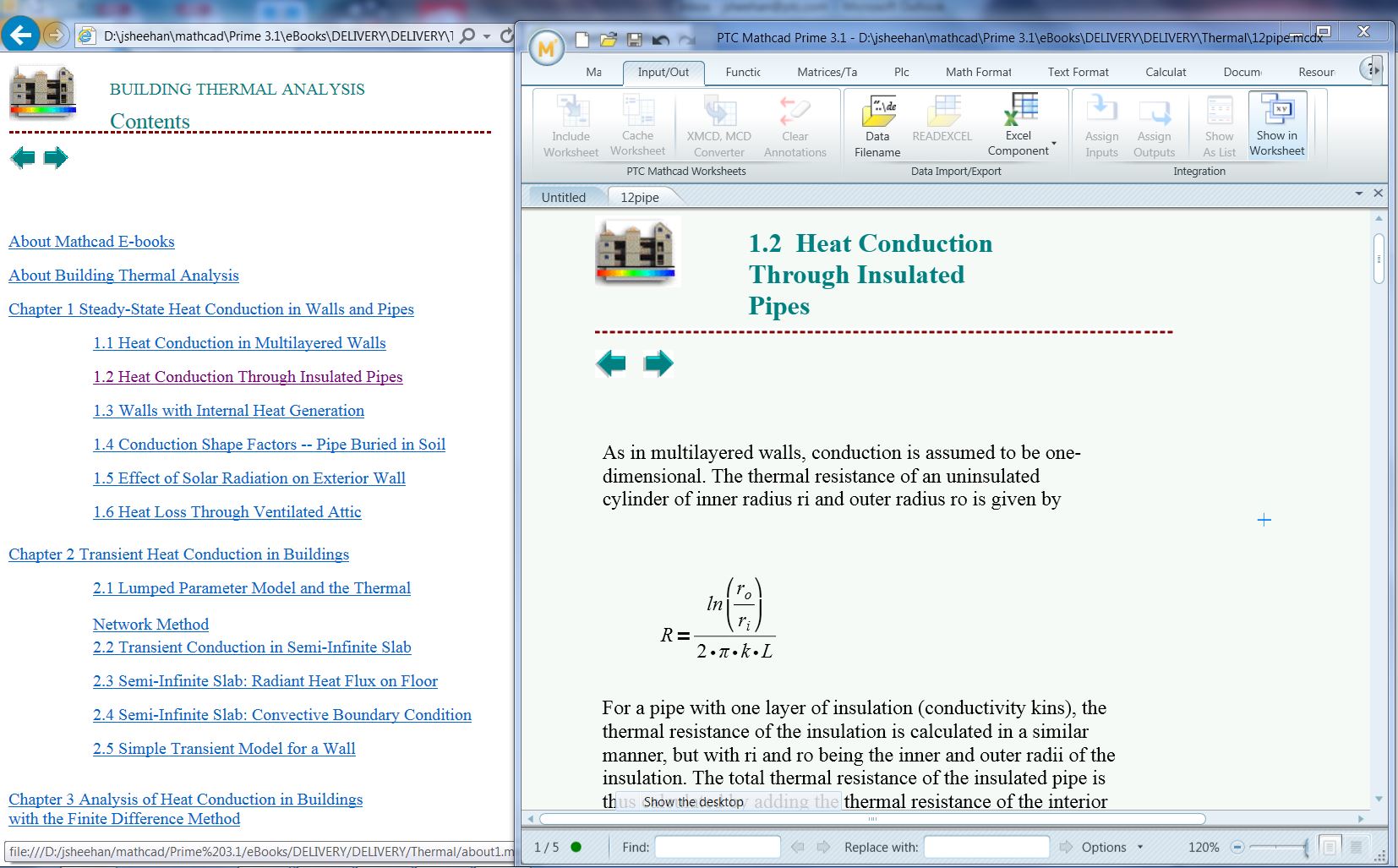
I'm not sure if you are aware, I found article CS200084 (see link below), and according to it, there is facility (conversion of documents to Prime format + VBS scripts to build linked HTML pages) to convert Mathcad 15 (and earlier) eBooks into HTML hyperlinked documents that automatically open in Mathcad Prime. The article describes the 8+ extension packs that came with various older versions of Mathcad (15, 14, 13, 12, etc.) that included "Topics in Electrical Engineering", "Finite Element Beginnings" (Febeg.hbk), "Building Thermal Analysis" (Thermal.hbk), "Building Structural Design" (Structur.hbk), "Roarks formulas for Stress and Strain" (Roarks.hbk), "Machine Design and Analysis" (Hicks1.hbk), "Electrical and Electronics Engineering" (Hicks2.hbk) and "Electrical Power Systems Engineering" (Power.hbk). It also says the scripts are easily adaptable to any custom eBooks. I haven't tried the process yet, so cannot comment on how successful or effective it is.

Although there is still the HUGE loss of the live math interface of eBooks and the ability to annotate them, and copy information from them directly into Mathcad, at least there is a simple way to access the information and preserve some of their value. Check out the link below for a Word doc explaining the process and a link to the required scripts. Meanwhile, I've attached a screenshot of the result (from the link below).screenshot.JPG
screenshot.JPG

BTW, I voted for the eBook suggestion for Prime 5 (there were only 6 votes including mine ).

The link to all this information is here:

https://support.ptc.com/appserver/cs/view/solution.jsp?n=CS200084

David

4 replies

25-Diamond I
May 17, 2017

I don't know what a worksheet add-on for Prime is, but as far as I know there is nothing comparable to Mathcads E-Books implemented in Prime.

15-Moonstone
May 17, 2017

I contacted PTC on whether eBooks was going to be included in Prime 5.  The support staff I talked to did not know what eBooks is.  I have added as a recommended feature.  You vote for it, but I am not sure where the recommended features are located.  PTC claims that Prime 5 will have all the features of MC15.  We will have to see.

25-Diamond I
May 17, 2017

David Tietje wrote:

I contacted PTC on whether eBooks was going to be included in Prime 5.  The support staff I talked to did not know what eBooks is.

Surprise?!

PTC claims that Prime 5 will have all the features of MC15.

The already claimed that for version 3.0 when they launched Prime 1 and I found that very strange then as I would have expected Prime 1 to be at least as powerful as Mathcad 15. Of course in the meantime we know why they still give you Mathcad 15 along with Prime - one program to play with and to wonder how slow and cumbersome tu use a modern program can be, and the other to do real work with.

I don't think that Prime will ever have all the features we were used from Mathcad as PTC sure has a new target group of customers in mind which will not miss features they aren't aware that they existed.

David_A10-MarbleAuthor
10-Marble
May 17, 2017

Thanks for your responses. I feared as much. From what I can tell, Prime 4 isn't really up to snuff compared to MC 13, 14 or 15. Certainly it has new features that they don't have, but functionality is diminished significantly. I'm beginning to regret the purchase. Promises that Prime 5 will have all the features of MC 15 are weak at best. Prime 5 should surpass MC 15. Was not Prime 1 and "upgrade" from MC 15? Yet we still haven't made it to the full feature set of MC15 even by version 4, years later.

Sorry for the rant. Just very disappointed and do not see how this version of the product is worth what they charge.

PS: Werner, if you go to the store and act as if you're trying to purchase MC, you'll see Worksheets that are offered for sale as well. When I bought the set (I think it was Applied Math), I thought it was the equivalent of ebooks found in MC v11,12, 13, 14, 15 since Prime was an "upgrade". The chief feature I liked was the lookup capability without disturbing my current worksheet, the ability to drag and drop items from the ebook into my worksheet and the ability to do live math in the ebook without changing it (oh, and the ability to notate it as well). That's a lot of loss.

Thanks

David

25-Diamond I
May 17, 2017

David Allen wrote:

From what I can tell, Prime 4 isn't really up to snuff compared to MC 13, 14 or 15.

You are not alone and in good company with that opinion.

Was not Prime 1 and "upgrade" from MC 15?

No, Prime 1 was just a joke. And strange enough it was not intended to replace Mathcad - PTC promised Prime 3 to include all Mathcad 15 features. Nevertheless they took good money for Prime 1.

PS: Werner, if you go to the store and act as if you're trying to purchase MC, you'll see Worksheets that are offered for sale as well. When I bought the set (I think it was Applied Math), I thought it was the equivalent of ebooks found in MC v11,12, 13, 14, 15 since Prime was an "upgrade".

Guess you just bought a couple of standalone worksheets.

23-Emerald I
May 18, 2017

You can view two Prime worksheets side by side; you launch a second Prime session.

If you have a MC 15 session going and download a MC 15 sheet (from this forum) and double-click to open it, your MC15 session opens it as a second window in the running session.  Prime, when confronted by the same issue, opens a new session (no second tab under the menu bar.)  So, you can have multiple sheets open side by side--if you have the computer resources required.

10-Marble
May 30, 2017

and each session draws one licence ...

honi soit qui mal y pense ...