
10-Marble
October 28, 2022
Solved

Assigning a Symbolically Solved Value to a Variable

  • October 28, 2022
  • 1 reply
  • 2296 views

Hello,


Mathcad Version 8.0.0.0


I am trying to assign the results of a symbolically solved equation to a variable so I can use that value later in my Mathcad sheet. Does anyone know if this is possible? I have included an example sheet of the problem I am facing. 


As background, the reviewing parties for our calculations are used to hand calculations so I am trying to stick to the formatting in my attached sheet as it is very similar to how you would write this problem up by hand. Unfortunately, some people are stuck in their ways.


Thanks!
Best answer by LucMeekes

This should work as you have used/written it. However, Prime auto-labels identifiers (names of variables, units, constants and functions), and...

everything that goes automatically can go automatically wrong.

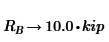
Notice how you used the unit kip, and Prime turns it to kip in the symbolic result, meaning it has turned your unit into a variable. And while the symbolic processor doesn't bother about variables that aren't defined to a numeric value:

LucMeekes_0-1666977853841.png

, the numeric processor does mind:

LucMeekes_1-1666977870970.png

It often helps to set the calculation option "Units/Constants in symbolics' ON...Alas, not this time.

There's another way to determine the value, using the root function, look it up in help:

LucMeekes_2-1666978116682.png

LucMeekes_3-1666978134771.png

LucMeekes_4-1666978150634.png

Success!
Luc


1 reply

LucMeekes23-Emerald IVAnswer
23-Emerald IV
October 28, 2022

This should work as you have used/written it. However, Prime auto-labels identifiers (names of variables, units, constants and functions), and...

everything that goes automatically can go automatically wrong.

Notice how you used the unit kip, and Prime turns it to kip in the symbolic result, meaning it has turned your unit into a variable. And while the symbolic processor doesn't bother about variables that aren't defined to a numeric value:

LucMeekes_0-1666977853841.png

, the numeric processor does mind:

LucMeekes_1-1666977870970.png

It often helps to set the calculation option "Units/Constants in symbolics' ON...Alas, not this time.

There's another way to determine the value, using the root function, look it up in help:

LucMeekes_2-1666978116682.png

LucMeekes_3-1666978134771.png

LucMeekes_4-1666978150634.png

Success!
Luc


10-Marble
October 28, 2022

Thanks, Luc! That is a great explanation and seems like it is working!

