
10-Marble
June 4, 2025
Solved

Assigning a variable to the result of a symbolic solution that already has an Equal

  • June 4, 2025
  • 2 replies
  • 1008 views

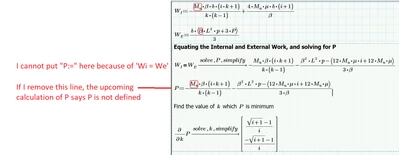
I am trying to assign the result of the symbolic solution of P to P so that I don't have to copy the result and assign it to P manually. See below and the attached mathcad file:
CN_13593194_0-1749065027566.png

is possible to write this so that the result of P doesn't have to be copied?

I want to change this because if I change the formulas above, I dont have to re-copy the results

Best answer by Werner_E

Why do you think that you can't put "P:=" in front ofW1=WE ... ??1

Put the cursor in front of the first "W" and either type "P:" or ":P". Both should work.

You sure will get an error, stemming from the numeric processor, which you can ignore.

Maybe  the result will not be displayed (not sure about that), but in any case P will hold the correct expression and to see it simply evaluate P symbolically.

2 replies

23-Emerald IV
June 4, 2025

You can simply define:

P :=  Wl = WE ------------>


With the "solve, P simplify" above the arrow.

The expression may show undefined variable errors, but the symbolic processor  will not mind.

If you want to prevent that, make P a function of all variables that end up in the solution:

P(Mu, k,.....) :=  etc...


Success!

Luc

netoprax10-MarbleAuthor
10-Marble
June 5, 2025

the moment I write "P :=" I cannot write "Wi = We" right after in the same math box


edit: I was able to do it. I have to type only : and wait for := show up and click. If I type :=, it doesnt work.

Werner_E25-Diamond IAnswer
25-Diamond I
June 4, 2025

Why do you think that you can't put "P:=" in front ofW1=WE ... ??1

Put the cursor in front of the first "W" and either type "P:" or ":P". Both should work.

You sure will get an error, stemming from the numeric processor, which you can ignore.

Maybe  the result will not be displayed (not sure about that), but in any case P will hold the correct expression and to see it simply evaluate P symbolically.

netoprax10-MarbleAuthor
10-Marble
June 5, 2025

thank you! as you said I have to type only : and wait for := show up and click. If I type :=, it doesnt work.