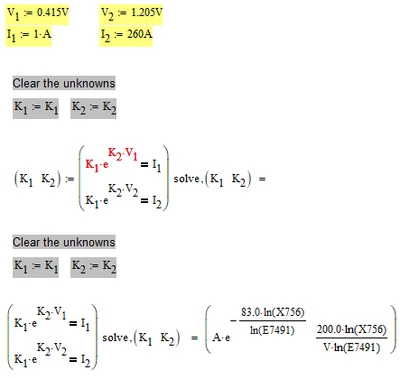
This is a fairly known effect and the symbolic still works OK. [EDIT: No, it doesn't. Look at the auxiliary variables X58 and E1491 which show up and cause the numeric error message]
Its simply the numeric engine throwing the error because of the assignment to variables.
The variables get a [EDIT: unusable] symbolic result anyway and you may display and use them after the calculation as desired.
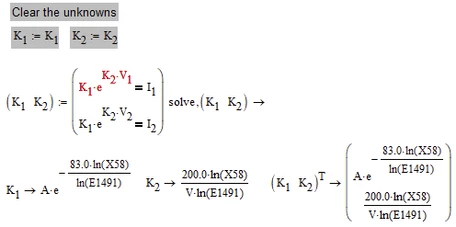
A strange side effect is that if you move the region with your mouse (left mouse button pressed down) the symbolic result is shown (but only until you recalculate the sheet).
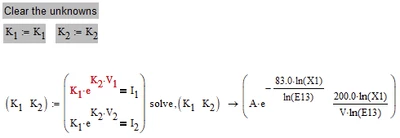
P.S.: When showing picture belonging to a question about symbolic evaluation its better not to show the evaluation as equal sign as it might be confused with numeric evaluation.
BTW, you wrote "it works fine as long as I don't try to assign the result". Did you really expected variables X1, E13 or X58 and E1491 in the result? 🙂
Mathcads symbolic engine unfortunately does not know anything about units and so A and V are treated as unknown variables (which may be negative or even not real). So given those unknowns, the expression seems to hard for muPad to solve and it shows some auxiliary variables in the result. I don't know what exactly is happening here but it seems to be caused by the conflict between forced to float mode (because of the float numbers provided) and the aim to solve as exact as possible using the ln. As Alan shows muPad sure is capable to solve the equation with variables only (no numeric values provided) and you showed in your second post that muPad is able to solve the equation if only numeric values are provided (even the Euler number).
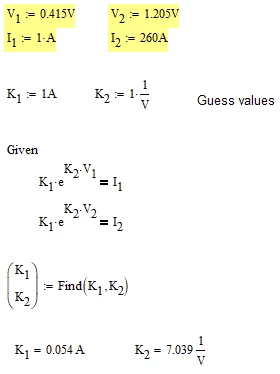
As you are just looking for a numeric result, why not just use a numeric method like a solve block?