12-Amethyst
April 27, 2017
Solved

Automatically changing color and text depending on a condition, an aesthetical question

  • April 27, 2017
  • 3 replies
  • 7487 views

Dear all,

I got from some old, long forgotten   training course the following (here very simplified) example of a scripted automated change of colour and text depending on a Boolean condition.

This is to me pretty useful, for example when there are many requirements that I have to prove all satisfied for example for a structural verification.

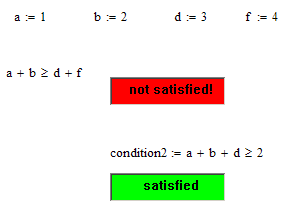
The only "problem" in this implementation is that the condition appears under the "traffic light" red / green message.
Unbenannt.JPG

This is because the Arguments have to be under the box.  I would definitely prefer having the coloured text message either on the right of the condition, or under it. Because it is a logical consequence of the condition, so the reading should go from left to right and downwards.

Of course I could define a dummy variable containing the condition and then use this one as dummy argument, and then "hide the arguments". This is a little error-prone when ones makes many cut-and-pastes.

This is admittedly a low priority aesthetical question...

But maybe ...

Anyway, thanks for any idea and best regards

Claudio

Best answer by Werner_E

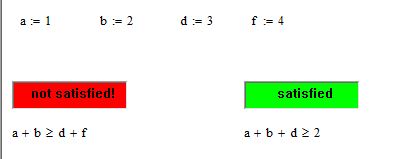
How about hiding the arguments of the text fields and either writing the conditions twice or assign it a variable?

3 replies

Werner_E25-Diamond IAnswer
25-Diamond I
April 27, 2017

How about hiding the arguments of the text fields and either writing the conditions twice or assign it a variable?

21-Topaz II
April 27, 2017

Hi Werner,

It does not work for me, why?

caselle a colori.jpg

25-Diamond I
April 27, 2017

You mean you get this error after opening Claudios and/or my file?

You should be asked if you want to disable scripts when you open those files and you have to click "No" for the components to work.

The error message you show indicates an error in the script of the component but I guess you have not changed anything - right?

Are you able to create scripted components yourself from scratch? (menu -> Insert -> Control -> Textbox)

Do scripted components work otherwise in other sheets in your configuration?

If "no" then you may consider registering those mcm files. As far as I remebmer there is a program with the name mcmreg.exe you have to call run as admin). Guess you can find references here in the forum when you search for,

Here are some findings:

Re: Problem with creating list box or other controls

Re: Trying to insert radio button

Re: Scriptable objects will not work MathCAD 15

Re: Drop-Down Boxes Not Working?

24-Ruby IV
April 27, 2017

I use pictures for this. And the if operator. Without scripts!

12-Amethyst
April 28, 2017

Thanks to Werner and Valery for the answers!

I will go with Werner's method, that is actually what I also was thinking... somehow I do not like to duplicate expressions ...they have the bad habit not to change both when you change one of them .  (I used to be a FORTRAN programmer, a lot of time ago... some habits are deeply rooted...).

The variable assignment followed by hiding the arguments seems, for my needs, the best solution.

The idea of Valery is genial, I would have never thought of it! But it is less flexible (changing the text for example) and it still has the same problem that the condition appears under the image (my original question).  And it would force me to "distribute" the picture files too, if I want to let someone else use my Mathcad-Worksheet.  On the other side, it does not need scripting, that is a bonus. Someone could appreciate that.

I have implemented it too in the attached file (and of course one needs also the two jpegs).

Again thank you everybody

Regards

Claudio

24-Ruby IV
April 28, 2017

My method does not scripts and I use it in Mathcad Server!