

1-Visitor
November 14, 2016
Question

Automatically selection Table value

  • November 14, 2016
  • 3 replies
  • 2903 views

Dear all,

I would to create a calculation sheet in Mathcad 15 where when I select an option the reference value are automatically selected.

For example:
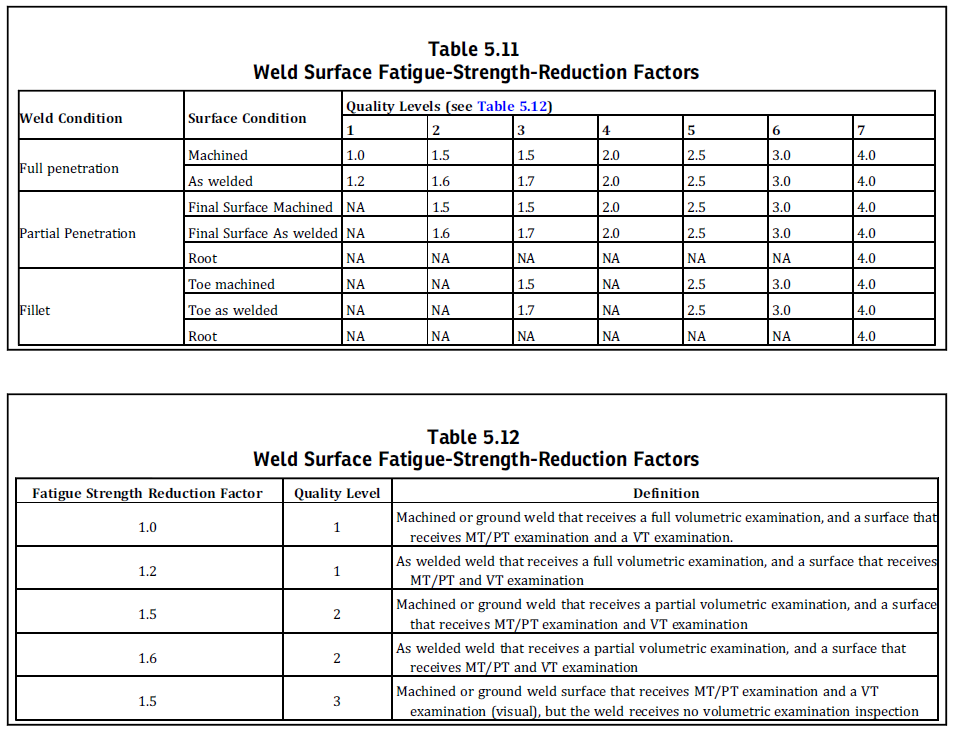
Immagine.png

In the previous table I would select the value determined by weld condition (full penetration) and quality level 2.

I would to create  a windows that, when I select this two condition, the referring value is automatically selected.

Best regards

Stefano

3 replies

23-Emerald IV
November 14, 2016

What do you define as the 'reference value' or the 'referring value'?

If in table 5.12 select 'Full penetration' and a quality level of 2, I still have to choose a surface condition between 'Machined' or 'Welded' to arrive at a single Fatigue strength reduction factor.

Luc

smilani1-VisitorAuthor
1-Visitor
November 14, 2016

Hi Luc,

I would create an automatically option into Mathcad to select the reference value. I mean the output value obtained by the input selection.

For the example in table 5.11 if I set Weld condition (full penetration) and surface condition (machined) and quality level  1 that are the input data, I would to automatically obtain the ouput (reference) value equal to 1.

Stefano

23-Emerald IV
November 14, 2016

But then, you might be looking for something like this:

Success!
Luc

smilani1-VisitorAuthor
1-Visitor
November 14, 2016

Is possible to obtain a similar results with control command Immagine.png?

Stefano

1-Visitor
November 14, 2016

I was just working on such a solution for you:

With this in a hidden or non-printed region:

File attached.

16-Pearl
November 16, 2016

This is how I did it in Prime.  I assume something similar works in 15.  Note the use of strings.

look1.jpg

look2.jpg

look3.jpg