4-Participant
November 22, 2023
Solved

[Beginner] How to document a function without defining variables?

  • November 22, 2023
  • 2 replies
  • 2196 views

Hello,


sorry, I have to ask some beginner questions:

1. I want to use the f'(x) notation but it seems that this is not possible. Mathcad is unhappy "variable not defined" about the f'. The function f(x) as such is defined. Is there a trick?


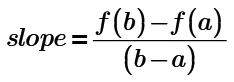
2. I want do document some functions without defining variables. For example "slope = (f(b)-f(a))/(b-a)". Once more Mathcad wants to force me to define b and a. But that doesn't make sense in my case since I just want to document the concept and not do an actual calculation. I use a text box with a inside calculation box to get the mathematical notifications. 

I feel deeply sorry that I have to bother you with probably very simple questions. 🙂 


Kind Regards

 

Best answer by DJNewman

Regarding 1, read the documentation on the prime operator: https://support.ptc.com/help/mathcad/r9.0/en/index.html#page/PTC_Mathcad_Help/derivative_and_prime_operators.html#

Regarding 2:


DJNewman_0-1700681113699.png

You can use the boolean equal sign (Ctrl + =; you can also find it in the Operators drop-down under "Comparison") to make such statements without actually having to define anything. This just serves as documentation.

2 replies

DJNewman
DJNewman18-OpalAnswer
18-Opal
November 22, 2023

Regarding 1, read the documentation on the prime operator: https://support.ptc.com/help/mathcad/r9.0/en/index.html#page/PTC_Mathcad_Help/derivative_and_prime_operators.html#

Regarding 2:


DJNewman_0-1700681113699.png

You can use the boolean equal sign (Ctrl + =; you can also find it in the Operators drop-down under "Comparison") to make such statements without actually having to define anything. This just serves as documentation.

PTC Marketer for Creo and Mathcad. I run their YouTube channels, some Creo campaigns, and all Mathcad campaigns and communications.
21-Topaz II
November 22, 2023

https://www.google.com/search?q=mathcad+prime+beginners+guide will bring up a beginners guide on youtube.

Capture.JPG

23-Emerald IV
November 22, 2023

Ad.2.

If you define it as a function of all parameters, you can do without error:

LucMeekes_0-1700686037533.png

Then the function you want to get the slope of doesn't need to be defined beforehand:

LucMeekes_1-1700686258355.png

Success!
Luc

Andre704-ParticipantAuthor
4-Participant
November 23, 2023

Hi guys, thank you for help.