1-Visitor
December 30, 2024
Solved

Breaking up equation with explicit, ALL - Mathcad Prime 8.0

Hi, I have a long equation that I would like to break in explicitly, ALL; however, I don't know if that is possible. Any suggestions? 


I am currently using Mathcad Prime 8.0

I appreciate any help you can provide.

MZ_9344990_1-1735559715167.png


Werner_E
Werner_EAnswer
25-Diamond I
December 30, 2024

LHS = Left Hand Side


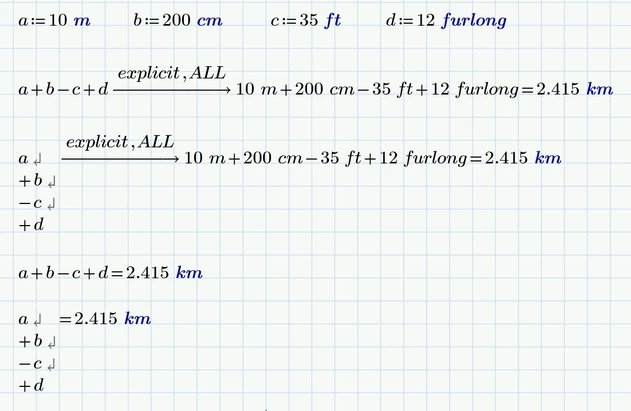
You can only insert line breaks in expressions you manually type in.

So all you can try is to use line breaks in the expression to the left of the "explicit,ALL" and you cannot modify the result to the right of it.


Her is an example:

Werner_E_1-1735568798343.png


And, yes, the line breaks in combination with evaluation in the top row look rather ugly and confusing 😞

I would prefer it at the bottom line.

3 replies

Werner_E
25-Diamond I
December 30, 2024

You mean that you want to insert line breaks so it doesn't spill over the right border?

You can manually insert line breaks at the left hand side at each basic operator (+,-,*, /) but the result will nonetheless be displayed in on line.

But maybe breaking the LHS into multiple lines can help so the whole region fits the page.

Werner_E_0-1735565787577.png


Translate
1-Visitor
December 30, 2024

Hi,

Well, it does not seem to work for me after explicit,ALL. Nothing happens as I click the equation break. I have already tried that.


What do you mean by breaking the LHS? 

Translate
Werner_E
Werner_E25-Diamond IAnswer
25-Diamond I
December 30, 2024

LHS = Left Hand Side


You can only insert line breaks in expressions you manually type in.

So all you can try is to use line breaks in the expression to the left of the "explicit,ALL" and you cannot modify the result to the right of it.


Her is an example:

Werner_E_1-1735568798343.png


And, yes, the line breaks in combination with evaluation in the top row look rather ugly and confusing 😞

I would prefer it at the bottom line.

Translate