12-Amethyst
May 7, 2021
Solved

Calculating the average successively from an array of numbers

  • May 7, 2021
  • 3 replies
  • 6073 views

I have an array, and I need to create another array, and calculate the successive average of the numbers as I move along the first array.

For instance, the average of 1st & 2nd, then the average of 1st,2nd, and 3rd, etc. till end of the array


Below some more explanation, including my attempt, but I could not reach what I am looking for. I appreciate your help... Thanks
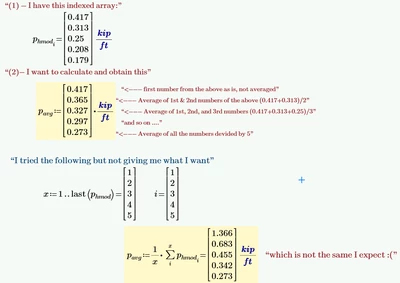

Eng_ReyD_497_1-1620405215427.png


Best answer by Werner_E

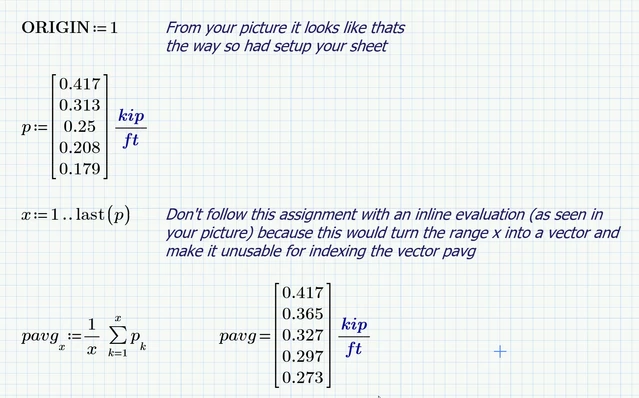
Here are my 2 Cents.
I can't read Prime 7 files and was working from the picture you posted.

I tried to provide a solution as close as possible to the attempt you made.

Werner_E_0-1620438989023.png


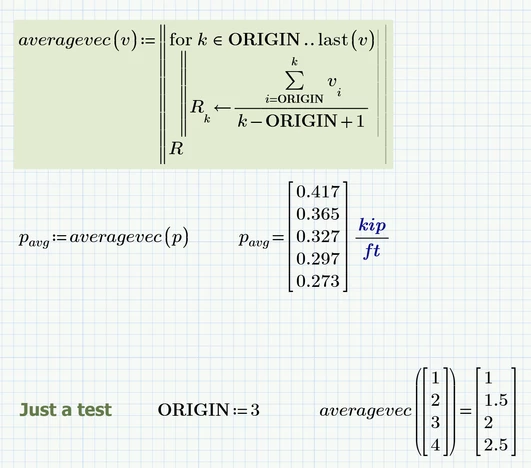
Nonetheless, personally I would prefer a userwritten uitility function with no need for any range variables defines on worksheet level and which is also independent from the setting of ORIGIN:

Werner_E_1-1620439416312.png


Prime 6 worksheet attached


3 replies

24-Ruby IV
May 7, 2021

Send please the sheet.

12-Amethyst
May 7, 2021

Thanks @ValeryOchkov .. attached is the file 

24-Ruby IV
May 7, 2021

kip.png

14-Alexandrite
May 7, 2021

Here is my approach using MCP 5.0.  I set ORIGIN to 1 to simplify the division of [running sum]/[running count] = running average.  I tried it inside the program, but the global setting in the Calculation menu seemed to defeat it, so it goes (for now at least) outside the program.  And, as best I can tell, the last step is required to get the complete vector of solutions.  Without it, I get just the last average.  A better programmer might be able to make this better.  At any rate, it's short and it works.


Running Average Through a Vector_001.jpg

12-Amethyst
May 7, 2021

Perfect... This works fine with me!!! Thanks @FredLusk ... I appreciate it...

14-Alexandrite
May 7, 2021

Thanks for the compliment.  However, Valery's is a little simpler and fits better on the page.  🙂

Werner_E25-Diamond IAnswer
25-Diamond I
May 8, 2021

Here are my 2 Cents.
I can't read Prime 7 files and was working from the picture you posted.

I tried to provide a solution as close as possible to the attempt you made.

Werner_E_0-1620438989023.png


Nonetheless, personally I would prefer a userwritten uitility function with no need for any range variables defines on worksheet level and which is also independent from the setting of ORIGIN:

Werner_E_1-1620439416312.png


Prime 6 worksheet attached


12-Amethyst
May 21, 2021

Thanks @Werner_E for the effort

That is really great!