16-Pearl
December 4, 2022
Solved

Cannot change range variable to vector in Mathcad 15

  • December 4, 2022
  • 2 replies
  • 1775 views

This works just fine in a fresh worksheet; however, in my more complex Ballistics worksheet, I get the following error.
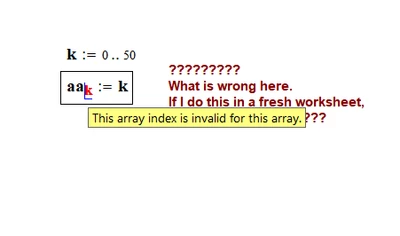
Screenshot 2022-12-03 173756.png

Both worksheets are attached.

Even if I close and reopen the ballistics worksheet, the problem persists.😫

Thanks for any help.

Reg

Best answer by Werner_E

You cleverly tricked yourself  😄

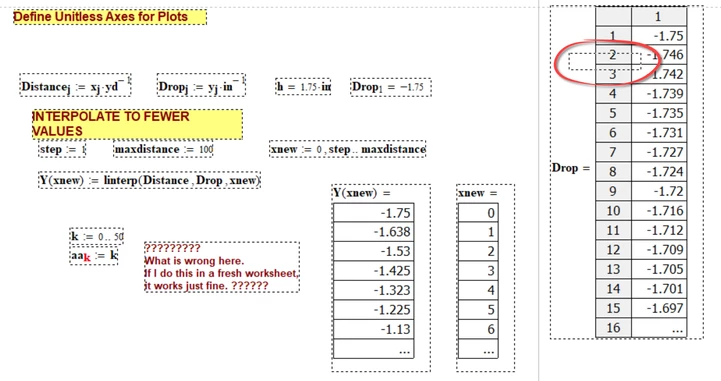
Underneath the evaluation of "Drop" there is a region which says ORIGIN:=1.

So the index 0 is invalid from that point on.

Delete this region and all will be OK again.

Werner_E_0-1670115057198.png


2 replies

regcurry16-PearlAuthor
16-Pearl
December 4, 2022

If I just move it up to here it works.  😩

Screenshot 2022-12-03 174635.png

Werner_E25-Diamond IAnswer
25-Diamond I
December 4, 2022

You cleverly tricked yourself  😄

Underneath the evaluation of "Drop" there is a region which says ORIGIN:=1.

So the index 0 is invalid from that point on.

Delete this region and all will be OK again.

Werner_E_0-1670115057198.png


regcurry16-PearlAuthor
16-Pearl
December 4, 2022

How did you find that?  By a select all?  I never thank to do that.🧐😵💫


Thanks much.  I really appreciate the help.🙏🏼

Reg

25-Diamond I
December 4, 2022

@regcurry wrote:

How did you find that?


Even before opening your worksheet my best guess was that you inadvertently had set ORIGIN to 1 in your worksheet.

But when I opened it I saw that ORIGIN was set to 0 (at least in Tools-Worksheet Options).

So I typed ORIGIN= to be sure and it showed correctly 0. I moved that region to the end of the worksheet and suddenly it showed 1. So I knew that somewhere in the worksheet you must have written ORIGIN:=1. My first guess was that it would be to the far right, off the screen. But by moving around my "ORIGIN=" region I quickly could locate the offending position. Fencing all regions in that area (as seen in the screenshot which I posted) quickly showed the position of that hidden region.


In the past I tricked myself in a similar way. It wasn't ORIGIN but a normal variable which happened to "mysteriously" change its value in the midst of the worksheet 😉