

1-Visitor
October 6, 2014
Solved

Cannot remove detail from worksheet

  • October 6, 2014
  • 8 replies
  • 2910 views

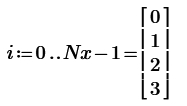
I've got a worksheet with an issue I don't understand. I have defined a set of sample indices using "i:=0..Nx-1" then build a spreadsheet using vectors with those indices. I wanted to see the array values when Nx=4 so I set the value and all was ok. When I go to remove the detail ... the [0,1,2,3] display that is ... the rest of the worksheet fails with a message "The value must be a scalar or a matrix". I know I'm being a bit vague but I don't really know how to better explain it so I have attached both good and bad versions of the file.

Any help would be appreciated

Thanks,

Paul
Best answer by MikeArmstrong

Paul Leopard wrote:

I appreciate your efforts and I see the worksheet you repaired is working just fine. When I compare it to my original that is not working I see no difference though.

There is a difference. As Werner mentioned, your 'Good sheet' worked because of a tricky, undocumented "feature". When you define a range and use inline evaluation like i:=0..3= , the range i is converted to a vector.

Clipboard01.jpg

Try deleting the inline definition and see what happens.

In Werners sheet he have defined XT using a vector index. Type XT[i and see what happens.

8 replies

Werner_E
25-Diamond I
October 6, 2014

When you define a vector using the range i you have to use the vector index (which you get by typing [) and not the literal index (which you get by typing Ctrl -)

It worked OK in your other sheet because of a tricky, undocumented "feature".

When you define a range and use inline evaluation like i:=0..3= , the range i is converted to a vector.

It didn't matter that you used the literal subscript, because you just did vector operations - the i in the name of your variables had nothing to do with the range/vector i but was just part of the variable name.

pleopard1-VisitorAuthor
1-Visitor
October 6, 2014

It works fine until I try to delete the element value display from the end

Werner_E
25-Diamond I
October 6, 2014

In the meantime I edited my above post and tried to explain that behaviour - its a bit tricky.

You may try it yourself. Just delete the index i in the names of your variables and you'll see that the sheet still is working OK.

Nevertheless I'd prefer the way I have shown in the sheet I posted.

1-Visitor
October 7, 2014

Maybe reading through the documents posted here might help with you understand.

http://communities.ptc.com/docs/DOC-6073

pleopard1-VisitorAuthor
1-Visitor
October 7, 2014

Boom! Yes that works ... I get it now.

Thanks guys,

Paul

1-Visitor
October 7, 2014

Super