
8-Gravel
February 13, 2020
Solved

Cantilevered Retaining Wall & Plotting functions

  • February 13, 2020
  • 1 reply
  • 1927 views

I am trying to plot a function which is dependent on 1 variable.  The attached worksheet calculates the required depth of embedment in soil for a cantilevered retaining for the case shown in Figure 3.11.5.6-5 of 2010 AASHTO LRFD Bridge Design Requirements.

When I try to plot the solution for the required depth, the plot dialog reports, "Plotting failed. Replace complex values and NaNs by real numbers."  The function is defined in terms of real numbers and the root() function provides a solution to the equation.  I am trying to plot the solution to see if there are other solutions which may be more appropriate for the conditions.

Best answer by Werner_E

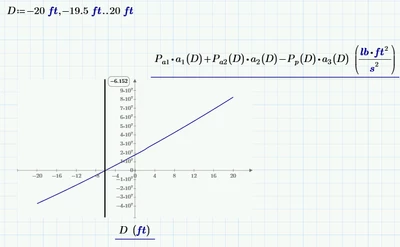
When you are using units, you cannot use the quickplot feature.

You must define a range (with units) for the abscissa values.

To define a range with units you must provide the first, second and last value

Werner_E_0-1581607312998.png


1 reply

Werner_E25-Diamond IAnswer
25-Diamond I
February 13, 2020

When you are using units, you cannot use the quickplot feature.

You must define a range (with units) for the abscissa values.

To define a range with units you must provide the first, second and last value

Werner_E_0-1581607312998.png


wbell8-GravelAuthor
8-Gravel
February 13, 2020

Thank you for the prompt response; the community is an excellent resource for learning how to get the most out of an excellent tool for the practice of engineering.