14-Alexandrite
February 21, 2024
Solved

choose minimum value

  • February 21, 2024
  • 2 replies
  • 3890 views

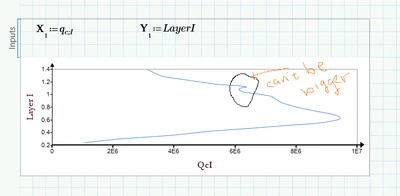
I need to make mathcad to choose the minimum value when it draws the plot. The next value can't be bigger than the previous value?

Please Help 
YA_10963798_0-1708499717872.png


Best answer by Werner_E

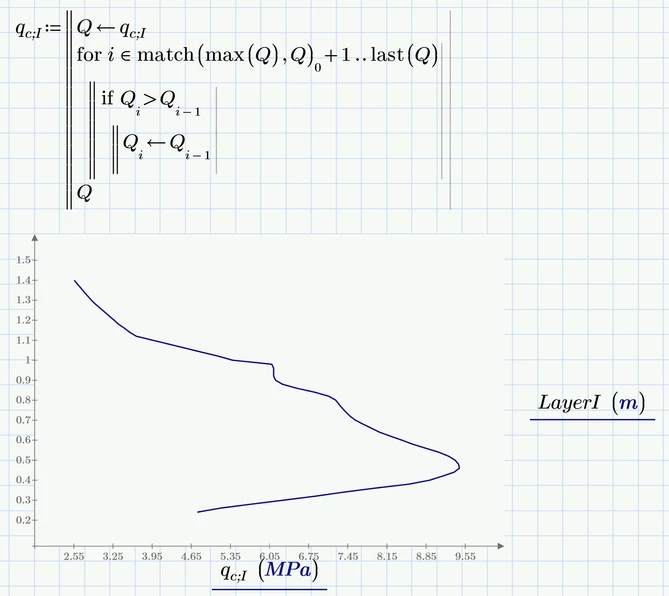
I am not sure but is this close to what you had in mind?

Werner_E_0-1708556278565.png


2 replies

23-Emerald IV
February 21, 2024

Please attach your Prime worksheet and state which version of Prime you are using.


Success!
Luc

14-Alexandrite
February 21, 2024

Have a look please

I need to fix this calculation 😥

23-Emerald IV
February 21, 2024

This expression:

LucMeekes_0-1708530493920.png

most probably does not do what you have in mind.

It contains a bad construct and results in qc;i being undefined.

As your file depends on an excel sheet, you should also attach that excel sheet.


Success!
Luc

Werner_E25-Diamond IAnswer
25-Diamond I
February 21, 2024

I am not sure but is this close to what you had in mind?

Werner_E_0-1708556278565.png


14-Alexandrite
February 22, 2024

can you please attach the worksheet 


25-Diamond I
February 22, 2024

@YA_10963798 wrote:

can you please attach the worksheet 


Sorry, I just played around with your sheet but did not save it.

Try to retype what I had shown in the picture and if you experience problems, come back and post the sheet.


Keep in mind that what I posted only works on the second "half" of the data, the one colored red in the following picture

Werner_E_0-1708612316258.png

That's the reason I am looking for the position of the largest value in the data (the point to the far right) using the "match" function and start the loop which compares each value with its predecessor just from there.

If a similar approach should also be applied to the first "half" of the data (the blue one) you would have to use a second loop but exchange the > for a <.


EDIT: OK, I reloaded your worksheet and implemented the foregoing mentioned treatment of both data "halves" in a utility function which I called "straighten( )". I guessed that you would like to treat more than just one set of data in a similar way and so a function for doing so makes sense. You may put it anywhere in the sheet (maybe in a collapsed area) as long as its before its first usage.

If you don't want the treatment of the first data "half" you can simply delete the first for-loop.

Werner_E_1-1708613303793.png


Worksheet attached (format Prime 9)