1-Visitor
June 5, 2021
Solved

Combo-box alternative methods of utilisation

  • June 5, 2021
  • 1 reply
  • 4632 views

Hi All,


These may be some stupid questions, but new to this environment from an excel background...


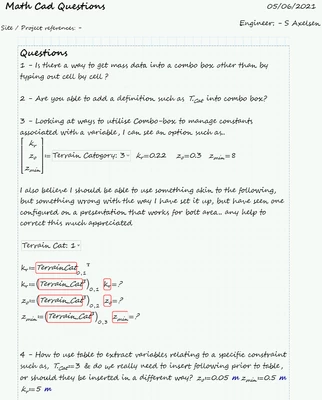
I have a number of questions which pertain primarily to how to use data within list / combo-box etc. to be able to extract a number of standard parameters associated with, snippet's below & file attached
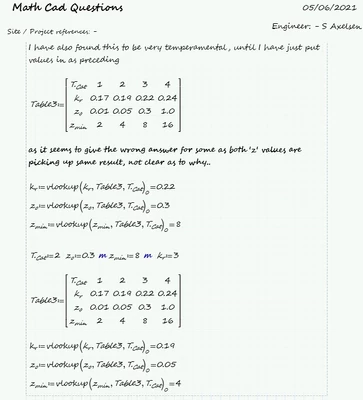
 

SA_9950729_1-1622896603765.pngSA_9950729_2-1622896629060.png


Best answer by ttokoro

4 is fixed.

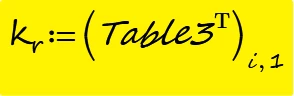
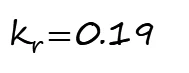
5. Using global  = to select the i index. This is my favorite method.


image.pngimage.pngimage.png


1 reply

23-Emerald I
June 5, 2021

Let me start by saying that I have NEVER been a fan of combo boxes.  And I'm confused by your sheet.  It seems that there are things missing.  (You need to have T.Cat defined to have vlookup work.)


That said, What you're showing has drawbacks.  For what you've shown, I would build a table.  (Tables replaced  data arrays from Mathcad 15.  If you select data in EXCEL and paste it into Prime, you get a table with blank headers:

Fred_Kohlhepp_0-1622908058794.png   Fred_Kohlhepp_1-1622908124055.png

One advantage of tables is that they allow units.  (Combo boxes will too, but that can get tricky, look for previous posts!)  In tables, you type variable names and units, and you get arrays.

Fred_Kohlhepp_2-1622908348178.png

And a lookup is just as easy:

Fred_Kohlhepp_3-1622908438442.png


1-Visitor
June 9, 2021

@Fred_Kohlhepp  thanks for that.


At this stage I want to try different methods to give me the best overall options to use Math cad, as have a lot of problems to resolve if I am to be able to make use of this..


Appreciate your thought's on what you consider to be a better product, & have updated the sheet I had to include your suggestion, & tweaked what I can of the others to make it more useful..

ttokoro
21-Topaz I
ttokoro21-Topaz IAnswer
21-Topaz I
June 9, 2021

4 is fixed.

5. Using global  = to select the i index. This is my favorite method.


image.pngimage.pngimage.png


t.t.