
1-Visitor
June 17, 2022
Question

Combo-box input is a Vector

  • June 17, 2022
  • 3 replies
  • 7239 views

Hi All

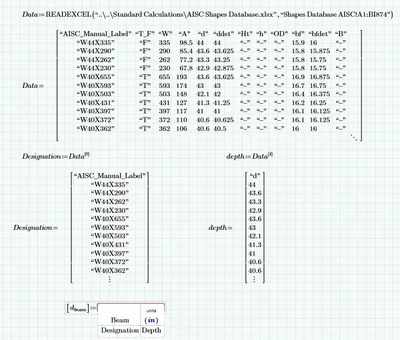
Looking to create a calculation which uses a drop down box to select beam size. I would like mathcad to then automatically populate all the remaining characteristics of the beam into the appropriate variables. I have downloaded the AISC shapes database as an excel file so I am using the READEXCEL function to input the excel data to mathcad. A combo box seemed like a really good fit. I'm trying to input columns from my data matrix into the combo box but it doesn't seem to be working. Any ideas? A snapshot of the simple worksheet below. 
AG_9665364_0-1655474756735.png


3 replies

25-Diamond I
June 17, 2022

Can it be because you wrote "Depth" instead of "depth"? Variable names are case sensitive.

1-Visitor
June 17, 2022

Thanks Werner_E. Great point. I updated the variable and unfortunately it still does not work. 

25-Diamond I
June 17, 2022

@AG_9665364 wrote:

Thanks Werner_E. Great point. I updated the variable and unfortunately it still does not work. 


That is regrettable. Unfortunately, I only have Prime 6 installed and therefore cannot say anything about the Combo Box, I only noticed the different spelling.
What error message is displayed?

I am just poking in the dark: You may check the labeling of the variables. When ever they occur this should be the same. If necessary you may manually label all occurrences of "depth" to "variable" or all to "-" (meaning autodetect):

I am not sure but it may be that Prime chokes on the first header entry of the columns "depth" which is a string"d" and not a number? In that case you may try depth:=submatrix(depth, ORIGIN+1, last(depth), ORIGIN, ORIGIN) to get rid of it in front of the combo box.


It would certainly make it easier for helpers with newer Prime versions to find the error if you could upload the worksheet  - or even better, a streamlined, simplified demo worksheet (without the need for extra Excel files to read in) which also show the same error.

21-Topaz II
June 17, 2022

Hi,

I adopt a different strategy than the combo box to get values from a large table.

Capture.JPG

Cheers

Terry

21-Topaz II
June 18, 2022

Hi

Option 2

Capture.JPG

Cheers

Terry

21-Topaz II
June 18, 2022

Hi,

Option 3

It transpires you can have 2091 rows in the edit box.  This database has imperial and metric quantities depending on what column you take.

Capture.JPG

Cheers

Terry

1-Visitor
December 9, 2024

I realize this is an older post, but it helped me develop an AISC selection tool using the List Box from the Advanced Controls that are in Prime 10 so I thought I'd post it in case others were looking for this. I only pulled the member properties that I typically use however anyone can add additional definitions to pull other columns from the provided AISC database. 


Notes: 

  • I'm using READEXCEL so be sure to have a valid path for the AISC database.xlsx
  • The ORIGIN is set to "0" so if you're in a sheet that has been changed to "1" you'll need to update the column references accordingly. 

Capture.JPG


1-Visitor
December 11, 2024

One small tweak to the script to save a users selection between sessions

3-Newcomer
January 27, 2025

What did you tweak to save the users selection between sessions? Thank you!