1-Visitor
April 3, 2016
Solved

Compare results from 'vlookup' function error: "This value must be a scalar"

  • April 3, 2016
  • 5 replies
  • 2042 views

I used the READEXCEL command to create a matrix that I can use Lookup Functions on.

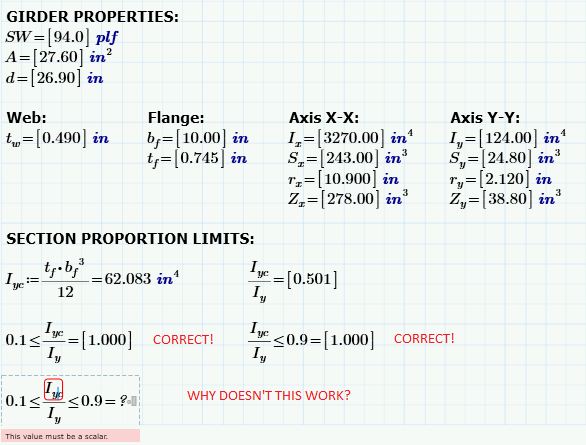
The Lookup Functions work perfectly except I can NOT compare the values as shown below:

Help.png

Help?

Best answer by Werner_E

lookup(...) returns a vector of values, not a single scalar.

In your sheet it looks like lookup just finds one value in every case you used it and so the variables you show are 1 x 1 matrices (thats the reason for the square brackets around the numbers). And a matrix - even if its just a 1x1 matrix - can't be compared with a scalar value - therfore the error.

In your case you should use lookup(.....)[0 to just select the first (and obviously only) element. I am assuming you use ORIGIN=0 as per default, other wise change the 0 to whatever you have set ORIGIN to or replace the zero by ORIGIN.

WE

5 replies

11-Garnet
April 4, 2016

I can tell that your Iy is in matrix format , try to return the matrix to normal.

11-Garnet
April 4, 2016

Or this way

24-Ruby IV
April 4, 2016

You have matrix with one element as an input value - ]123] - why not 123?

Werner_E25-Diamond IAnswer
25-Diamond I
April 4, 2016

lookup(...) returns a vector of values, not a single scalar.

In your sheet it looks like lookup just finds one value in every case you used it and so the variables you show are 1 x 1 matrices (thats the reason for the square brackets around the numbers). And a matrix - even if its just a 1x1 matrix - can't be compared with a scalar value - therfore the error.

In your case you should use lookup(.....)[0 to just select the first (and obviously only) element. I am assuming you use ORIGIN=0 as per default, other wise change the 0 to whatever you have set ORIGIN to or replace the zero by ORIGIN.

WE

kwadley1-VisitorAuthor
1-Visitor
April 4, 2016

Thanks all!

I followed Werner's advice as my lookup function will ALWAYS return a single value.

Here are my results:

Results.PNG