7-Bedrock
February 17, 2022
Solved

Concat string

  • February 17, 2022
  • 2 replies
  • 4372 views

How to take out some part of the number defined through evaluation definition and use it further for calculation.

For e.g. I have set of 3 number clubbed and 24 such sets separated by comma and space and would like to use 7 set for calculation purpose later in worksheet. Is there any possible solution for this 

Best answer by Werner_E

The data in your sheets seems to be copied text (!) from a word document.

What is the original format the data is actually provided in? I guess it can't be a text document but rather something like a csv file or the like.


Here is a stupid and dull way to handle the data as its provided in your example sheet:

1) Double click the region with the data

2) Word should open; select the data row and copy it using Ctrl-C

3) Switch back to Prime and type "data:=" (without the quotes) and then press Ctr-V to insert the data. The result should be that you created a string variable containing the data values separated by commas.

4) Now you can write a simple parser to separate the values in the created string, convert them to numbers and store the results in a vector

5) Now you can access individual vector values using the normal ways to deal with vectors.
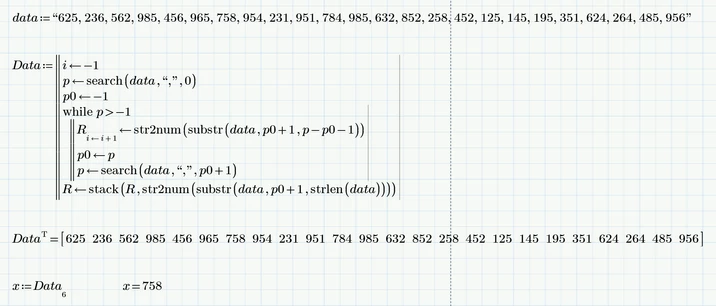
 

Werner_E_0-1645141138154.png


But I am pretty sure that there will be much better ways to go once you reveal what format the actual data is provided in.


Prime 6 worksheet attached

 

2 replies

12-Amethyst
February 17, 2022

Please, upload the documents you're working with so I can understand.

25-Diamond I
February 17, 2022

There sure may be solutions for your problem but I guess you will have to go into more detail describing what exactly you are looking for, give some concrete examples (stating the input and also the output you expect) and attach your sample worksheet.

7-Bedrock
February 17, 2022

I am adding the sample worksheet with same agenda 

12-Amethyst
February 17, 2022

Copy-paste the text into Excel. If it all ends up on one cell, use "Text to Columns" in the Sort & Filter pane of the Data tab, choosing comma as your delimiter. You'll have to copy the row and paste it transposed into column A to get it into the format you want. Save it as a .CSV


Use READEXCEL to upload the data into your mathcad sheet, or use an Excel component. (Your choice, based on what you're most comfortable with). Once you have an array loaded up with your excel data, you can play with it in MathCAD however you wish. 


Does this help?
