13-Aquamarine
October 20, 2025
Solved

conditional formatting

  • October 20, 2025
  • 1 reply
  • 525 views

How can I add conditional formatting to Mathcad sheet similar to what is available in excel?  I was envisioning formatting the output of a Boolean equation using Mathcad.   As near as I can tell, there is nothing in the Mathcad Prime 11 help that leads to some form of conditional formatting.
Best answer by Werner_E

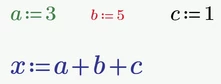
The color, size, etc. of variables in a math region cannot be changes singly. You can only change the appearance of ALL variable names, etc. in a region and it only could be done manually via the menu.

So you can (manually) create something like

Werner_E_0-1760978168427.png

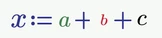
but you cannot create something like

Werner_E_2-1760978237214.png


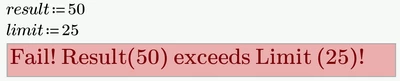
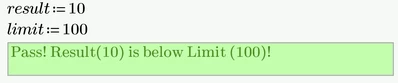
Find attached an example of a scripted text box. I slightly modified the example from the help  (see here).

Werner_E_5-1760980280307.png

Werner_E_6-1760980314170.png

Primes scripted components are quite limited compared to other programs (and also Mathcad 15) so we only can modify background color, text color and text size. There is not auto-resize, no choice of font used, etc.  (See here)


1 reply

25-Diamond I
October 20, 2025

Could you perhaps explain in more detail what exactly you have in mind? It would be best if you could give a specific example.


If by 'formatting' you mean things like page size, margins, grid size, but also headers and footers, then I'm afraid that's not possible in Prime.


If you mean things like font size, font color, etc. for a specific region, then using a scripted component (text box) could possibly be a solution.
However, the appearance of โ€œnormalโ€ Mathcad regions cannot be modified programmatically.


13-Aquamarine
October 20, 2025

I'm referring to variables within math regions that could possibly be modified programmatically.  I infer that this is not possible.

Werner_E25-Diamond IAnswer
25-Diamond I
October 20, 2025

The color, size, etc. of variables in a math region cannot be changes singly. You can only change the appearance of ALL variable names, etc. in a region and it only could be done manually via the menu.

So you can (manually) create something like

Werner_E_0-1760978168427.png

but you cannot create something like

Werner_E_2-1760978237214.png


Find attached an example of a scripted text box. I slightly modified the example from the help  (see here).

Werner_E_5-1760980280307.png

Werner_E_6-1760980314170.png

Primes scripted components are quite limited compared to other programs (and also Mathcad 15) so we only can modify background color, text color and text size. There is not auto-resize, no choice of font used, etc.  (See here)