1-Visitor
November 20, 2025
Solved

Confuse with Scalar and Vector

  • November 20, 2025
  • 1 reply
  • 265 views

Hi, 

I am new to mathcad and trying to input result from a formula as attached. However, the error red that stating the value must be a scalar and vector. 

How I can fix that? Appreciated to your guys response and help


Thanks, 

Kala

Best answer by Werner_E

There is no error in the sheet you posted.


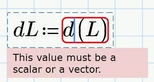
But I guess that you probably tried to assign d(L) to a variable and saw that error
Werner_E_0-1763665729530.png

Reason is that L is a range, not a vector!


What you did worked OK up to Prime 9 because in these older versions the inline evaluation (the "=" you put right after the range definition) converted the range into a vector.


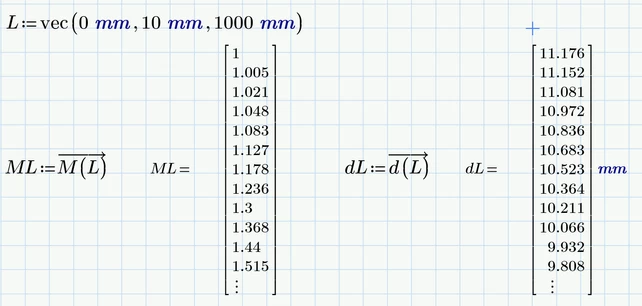
Starting with Prime 11 we have a new function "vec" which makes is easy to create a vector using the same values used in a range definition.

When using this vector as argument for your functions you have to apply the vectorization operator (the arrow over the expression):
Werner_E_1-1763665962800.png


In case you are using Prime 10 you have to create the vector by other means.



1 reply

Werner_E25-Diamond IAnswer
25-Diamond I
November 20, 2025

There is no error in the sheet you posted.


But I guess that you probably tried to assign d(L) to a variable and saw that error

Werner_E_0-1763665729530.png

Reason is that L is a range, not a vector!


What you did worked OK up to Prime 9 because in these older versions the inline evaluation (the "=" you put right after the range definition) converted the range into a vector.


Starting with Prime 11 we have a new function "vec" which makes is easy to create a vector using the same values used in a range definition.

When using this vector as argument for your functions you have to apply the vectorization operator (the arrow over the expression):

Werner_E_1-1763665962800.png


In case you are using Prime 10 you have to create the vector by other means.