
1-Visitor
November 30, 2014
Question

Could you help me to caculate with nested array?
  • November 30, 2014
  • 2 replies
  • 4300 views

12.PNG

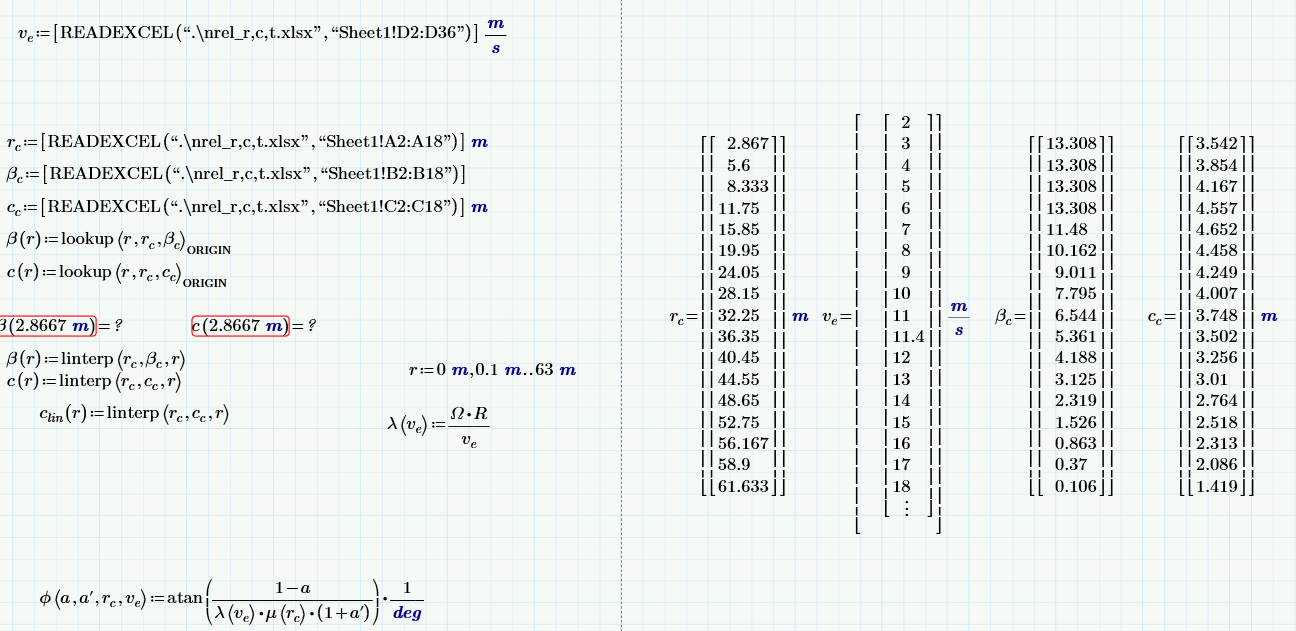
1. Is it right nested array in right picture?

2. If It is right, why did I can't caculate under fuction?

I don't know well about "nested fuction'

so I tried to find matarials about it.

But I couldn't find it.

please help me how to use "nested function"

2 replies

23-Emerald V
November 30, 2014

It looks like your vectors are nested, but you functions don't appear to take any account of this. A nested array is an array which contains other arrays. Lookup functions only operate on the top level elements of an array and expect to find scalars, not vectors. To make your functions work, you need to "unnest" your "subvector", so the lookup functions can see its elements. Eg, cc[0 (or cc[1, depending upon your ORIGIN).

Stuart

jlee-21-VisitorAuthor
1-Visitor
November 30, 2014

I am sorry. I can't uderstand well...

the top level elements of an array>>>>> what is the meaning?

you need to "unnest" your "subvector">>>>

I search for "unnest and subvector" in "mathcad help".

But I can't find them. so could you explain more?

23-Emerald V
November 30, 2014

Hmm, tricky without Mathcad to hand, but ...

Create a blank matrix from the menu. It doesn't matter what size, but 3x3 or 3x1 will do. You should see a matrix with empty placeholders ready for you to enter data into. These placeholders are what I call the "top level" elements. Normally you would put scalars, strings or even function names in the placeholders. Such an array is called a "flat array", the kind you see in most maths books, and Mathcad's function expect to operate on such arrays.

However, you can also put a vector or other array, into a placeholder. When you do this you create a "nested array", even if only one element is a vector and the rest are scalars. In fact, you can even put a nested array into a placeholder.

What I call "unnesting" is getting a nested element (vector, matrix or nested array) from the main (or "top level") array. So, for example, if a vector v has v[2 set to another vector, then you unnest it by simply referring to its index, eg w:=v[2.

Stuart

25-Diamond I
November 30, 2014

jinsuk Lee wrote:

1. Is it right nested array in right picture?

Mathcad is just showing you what you had created. It looks like you had put the READEXCEL commands in square brackets and that creates a vector consisting of the result of the READEXCEL command, which is a vector, too. So you have created a 1x1 vector whose only element ist the vector of values read by READEXCEL.

I see no reason why you would do this and maybe it was a mistake that you typed those square brackets.

2. If It is right, why did I can't caculate under fuction?

This was already explained by Stuart. rc is a 1x1 vector whose only element is a 17x1 vector.

lookup() looks at rc to find the value 2.8667 m but all it finds is the one 17x1 vector (it only looks at the top level elements and not inside that nested vector), so it fails.

So I think you should omit those square brackets you have inserted for reasons unknown to us and I suspect it was done by accident or dispair 'cause something else had not worked.

You should also delete those lookup functions as they are replaced by the interpolating functions below anyway.

jlee-21-VisitorAuthor
1-Visitor
November 30, 2014

thank you for helping.

whenever I use "mathcad", I have thought that I didn't know very much about this program.

Actually I can't understand your advice. But I think it is useful for me.

25-Diamond I
November 30, 2014

jinsuk Lee wrote:

thank you for helping.

whenever I use "mathcad", I have thought that I didn't know very much about this program.

Actually I can't understand your advice. But I think it is useful for me.

My advice is to delete all square brackets and both lookup functions - delete all which is marekd in yellow:

1.png