
10-Marble
January 5, 2024
Solved

Creating graph with dual y axis for Bode plots

  • January 5, 2024
  • 3 replies
  • 3262 views

I am wondering if anyone knows a way to make a Bode plot that shows a y-axis on the left for db (amplitude) and a scale on the right for phase.  The Plot function does not support it, but I thought perhaps the "chart" function does since it does allow a second y axis scale on the right.  But as I understand it, this is not quite the case.  In the "chart" function it seems that the scale on the right is only a replica of the one on the left.  This function was very nicely supported in Mathcad 15.  Is there a way to do it in Prime 9?  Much appreciation for any thoughts/help!
Best answer by JK_10910070

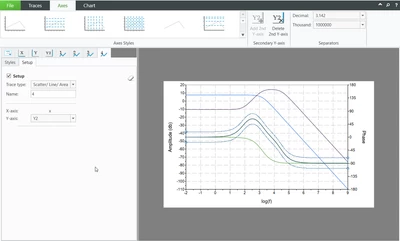
So with some more stumbling, I was indeed able to make it work!  The key point I was looking for was how to go into the window to set which axis each equation used.  Once I found that, it all works wonderfully!

JK_10910070_0-1704578684132.png

Thank you for the help!!!


3 replies

24-Ruby III
January 5, 2024
10-Marble
January 5, 2024

These articles do not address the original question.  I already can plot magnitude Bode plots or phase Plots separately, or even make both make db magnitude plots and phase plots together; but they use the same scale.  I want to be able to use 2 different scales.


JK_10910070_0-1704483415249.png

In th4 above plot (from MCAD 15) you can see that the db magnitude is on the left and the phase scale is on the right.


The question is NOT how to make Bode plots.  It is how to do it with separate amplitude and phase scales that are separately controllable.

DJNewman
18-Opal
January 5, 2024

Have you looked into the Chart Component, then? It allows for more detailed plots and formatting, and importantly for you, a second y-axis.

PTC Marketer for Creo and Mathcad. I run their YouTube channels, some Creo campaigns, and all Mathcad campaigns and communications.
25-Diamond I
January 6, 2024

In the "chart" function it seems that the scale on the right is only a replica of the one on the left.

Do you mean you can't set the axis limits and step width independently from each other in the Chart Component.
I can't provide an example as the Chart Component is unusable in my configuration, but I would have expected that it should be possible to set different values for the Y and the Y2 tab here:

Werner_E_1-1704504205538.png


ttokoro
21-Topaz I
21-Topaz I
January 6, 2024

image.png

t.t.
10-Marble
January 6, 2024

You have definitely showed me that it can be done and I would have been surprised if it could not; but for some reason I cannot make it happen in my worksheet.

JK_10910070_0-1704577485926.png

As you can see in the above picture, I have changed the right hand y2 axis but it does not update on the graph.  Also, I cannot seem to find where to associate each data (or equation) with which scale.  Do you know of a tutorial on how to do this which would walk me through it.  I have literally spent hours trying to do it and cannot seem to make it happen.  Thanks!

JK_1091007010-MarbleAuthorAnswer
10-Marble
January 6, 2024

So with some more stumbling, I was indeed able to make it work!  The key point I was looking for was how to go into the window to set which axis each equation used.  Once I found that, it all works wonderfully!

JK_10910070_0-1704578684132.png

Thank you for the help!!!