1-Visitor
January 22, 2012
Solved

Ctrl-Shift-J

  • January 22, 2012
  • 3 replies
  • 6322 views

Does anyone know what this feature is for? I had someone stumble across it by mistake. She defined a "variable" to be one "M/ϕ" and the display actually showed M directly over the ϕ. The whole thing shows up inside of square brackets. She proceeded to assign a value to this expression, and it can be used later on as if it were a variable (as long as the square brackets are also used). Is this the intent of the feature?
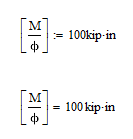
Image 1.gif

Preston

Best answer by VladimirN

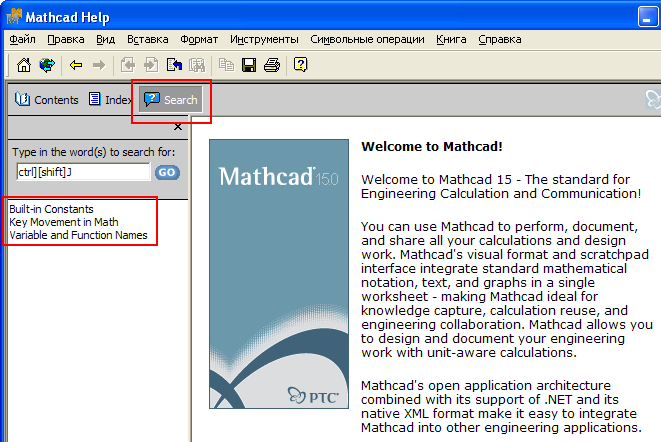
A quote from "Mathcad Help" (see more in attachment):

"[Ctrl] [Shift] J Type characters inside brackets as in chemistry notation.

[Ctrl] [Shift] K Type characters that usually insert operators."

Pic_1.PNG

3 replies

24-Ruby IV
January 22, 2012

I use so:

http://twt.mpei.ac.ru/ochkov/Mathcad_14/Chapter1rus/44.png

1-Visitor
January 22, 2012

Good find. Maybe its an affiliation of ctri+shift+k

Mike

23-Emerald IV
January 22, 2012

It's a documented feature "chemistry notation".

Search 'ctrl][shift]J' in the Mathcad help menu to find more info.

I wasn't able to find it in the (PDF) manual.

Luc

24-Ruby III
January 23, 2012

Also, all keyboard shortcuts for Mathcad 15 can be found in the attachment (or here: http://communities.ptc.com/docs/DOC-2476).