1-Visitor
October 20, 2020
Solved

current value - past value

  • October 20, 2020
  • 2 replies
  • 2343 views

Hello,

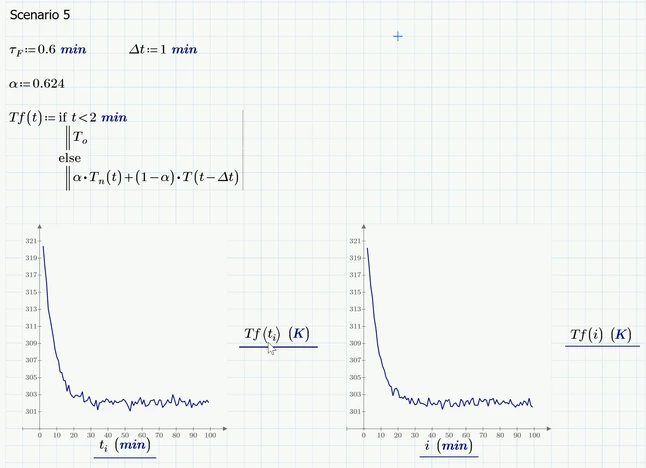
in the scenario 5, I will need to do Tfi = alpha*Tn+(1-alpha)*Tf(i-1). which mean the new Tf value  at time (i- 1). I'm not sure how to have that i-1 here in MathCad. Tn is calculated in scenario

I used i-1 vector subscript but it seems doesn't work

I really appreciate if you can help me to take a look this. Thank you so much!

Best answer by Werner_E

Maybe like that:

Werner_E_1-1603221640686.png

Forget about t.i when you define your functions and use t.i just for plotting.


There also is no reason for defining i first an then writing t.i:=i (with a literal index). This would only result in t.i being the very same range as i. So you may just define t.i:= 2min, 2min+Delta t ... firsthand and use this range for plotting as you can see in the picture on the right. The plots look differently because of the random numbers. The plots also change every time you let the sheet recalculate (pressing F5).


2 replies

23-Emerald I
October 20, 2020

I'm surprised this worked:  

FredKohlhepp_0-1603222260779.png

A better way:  

FredKohlhepp_1-1603222291070.png

But the problem you may have is with using minutes as a subscript (and subtracting 1)


25-Diamond I
October 20, 2020

@Fred_Kohlhepp wrote:

I'm surprised this worked:  


It worked because when defining t.i := i  a literal index is used. So t.i simply is the same range as i .


In the function definition vector indices were used and this could not work as t is not a defined vector and the index i is not dimensionless.

Werner_E25-Diamond IAnswer
25-Diamond I
October 20, 2020

Maybe like that:

Werner_E_1-1603221640686.png

Forget about t.i when you define your functions and use t.i just for plotting.


There also is no reason for defining i first an then writing t.i:=i (with a literal index). This would only result in t.i being the very same range as i. So you may just define t.i:= 2min, 2min+Delta t ... firsthand and use this range for plotting as you can see in the picture on the right. The plots look differently because of the random numbers. The plots also change every time you let the sheet recalculate (pressing F5).


1-Visitor
October 21, 2020

Hello,

I actually did it already. It was i issue, I supposed to be numerical subscript. thank you so much everyone, project is done 🙂