


Custom Functions Dialog
One legacy feature that has still not been integrated into Mathcad Prime, is the ability to provide companion XML files that integrate Custom Functions documentation into the Mathcad interface. Legacy Mathcad would read these XML files and add the new functions to the list of internal functions in the Insert Functions panel under their own, specified Function Category.
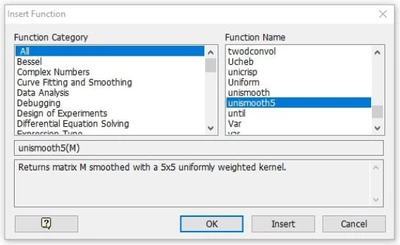
Legacy Insert Function Panel
While Mathcad Prime does contain a Functions panel for inserting built-in functions (can be triggered with <F2>), it does not allow for incorporation of categorized Custom Functions into that interface. For DLLs containing a large number of Custom Functions, this can be problematic for users to know which functions to use, what they do, what parameters are needed, and the proper function syntax.
I've managed to create an open-source add-in, CustFunc, that brings back the Legacy insert functions behavior for Custom functions, reading the function names, categories, syntax, and descriptions from XML files stored in the folder "Custom Functions\docs". These XML files follow the legacy syntax exactly, with a few enhancements for implementing Unicode characters and constants. When CustFunc.dll is placed in the Custom Functions folder, any XML files found in the docs folder are read and the new Insert Custom Function panel is launched with hot keys <Shift><F2> (not currently being used by Mathcad Prime).
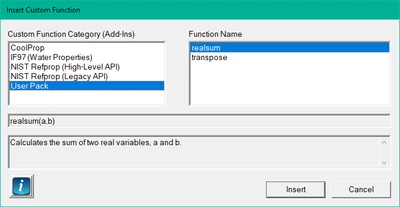
New Insert Custom Function panel supplied by CustFunc Add-in
CustFunc does not add any new functions of its own, but only provides simplified user access to any loaded Custom Functions if their companion XML files are found in the docs folder. You can download the CustFunc add-in from the Releases page of my GitHub CustFunc repository. There are also a number of example XML files there for use in the sampleXML folder. Feel free to report issues there, post a discussion about the add-in, offer enhancement suggestions and/or contribute to the project.
