
1-Visitor
July 31, 2014
Solved

Data syncronize by using component (mathcad 15)

  • July 31, 2014
  • 2 replies
  • 21366 views

Hello there,

Above all, I am the very biginner for Mathcad as well as programming. So please forgive me if my questions would be so basic or stupid. (i am trying. ;;;)

Since I have several data to be selected by users, I've decided to use mathcad 15 than prime so that I can make full use of components.

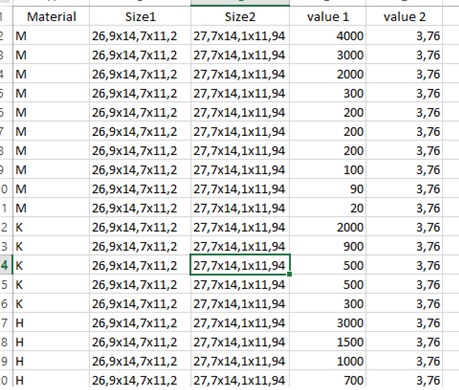
I am making a calculation worksheet with a number of back data and I want to know how to syncronize data, like. (refer to the attached also)
example.jpg

I have 4 materials for moment having information of size 1&2, parameter 1&2.

Some information is duplicated, some is not.

Under this situation, I want to program like..

when I select material 1 in the 1st list box (or ribbon which is more favorable), the second list box (or so) shows only the applicable information.

the third, forth and fifth.. accordingly.

Any advice on this?

By the way, I read a forum explaining about list box which was greatly helpful to me and I could hardly understand a part.

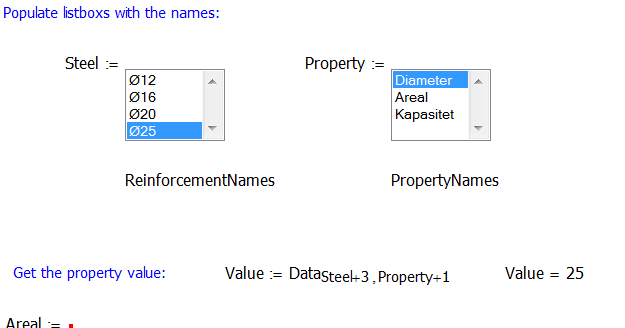
I've brought a screen shot below and I want to know what "+3" or "+1" of steel +3, property+1 does exactly mean or work.
mathcad.png

Thanks so much in advance.

S

Best answer by Werner_E

I guess the attached sheet should do what you want.

EDIT: Changed the components script slightly so the type of the return value is identical to the input type and not automatically converted to a string. So the subsequent str2num() conversion can be omitted.

2 replies

12-Amethyst
July 31, 2014

Hi,

Its not so easy trying to explain without the original mathcad file, but here goes.

Some where in the sheet you have a two dimensional array 'data' defined which contains all the information that you want to access.

Next you have 2 list boxes which allow you to select from a number of items and each will return a number which identifies the choice that you make.

so in the picture that you show ,

for 'steel' perhaps:

diameter 12; steel = 0

diameter 16; steel = 1

diameter 20; steel = 2

diameter 25; steel = 3

and similarly for the value 'property'.

these values can be used to find a unique entry in the data array,

In the attached file you will see how the index system works, the first number specifies the row & the second the column.

Sometimes it is helpful to put a text row or column (or both) to describe what the data means & if necessary units for the data.

So the first few rows & columns may not contain numbers.

by using 'steel + 3' a value of 0 for steel will get the data from row 3.

Hope this goes some way towards an explanation of what you sheet is doing.

Regards

Andy

SKim1-VisitorAuthor
1-Visitor
August 1, 2014

Thanks so much for your attention and suggestion.

I got the sense of matrix index number thanks to you.

BTW, I am not still pretty sure how to use (or start) list box for those data - maybe as you said, it's not easy to explain with example sheet.

what I want to do is like PIVOT in excel - Only possible to show (or be able to select) applicable data according to the condition.

1. If you choose material M,

2. Only following size(sizes) is shown

3. Then, surely only following value is shown. (Size A would have values 130 and 500, while Size B would have ones 130 and 400)

example-pivot.png

Thanks for the attention again.

Best regards,

S

12-Amethyst
August 1, 2014

the attached shows a few ideas (mainly take from this , or the previous forum).

Hopefully it will give you a starting point for creating the listbox structures that you want.

the first (Steel) it a fixed list which will always look the same, the second one (Property) takes Steel as a parameter & is written to show specific values for each version of Steel.

The last list box is added as an example of how the list box can be given a set of strings through an input parameter.

I've tried to minimise the amount of code in each box , but if you have any questions, feel free to ask.

Regards

Andy

SKim1-VisitorAuthor
1-Visitor
August 4, 2014

Hello Andy and Werner,

So appreciate to your helps, it's really astonishing to see how this works.

Will try to follow your guidance and hope to find the way out.

I wish I, someday, could help others like you.

Best Best regards,

S

12-Amethyst
August 4, 2014

This is the way I started & I am very happy to be able to pay it forward.

It takes time to discover some of the facets of mathcad & I think that most (if not all) on the forum are still learning.

Best way to learn is to try.

Regards

Andy