
10-Marble
November 5, 2023
Solved

Database queries

  • November 5, 2023
  • 2 replies
  • 4457 views

Currently using, Prime 9.0.0.0.


In ANY version, is there a way to have a simple database query like return "weight" from "AISC Shapes.xlsx" where "Name" = "C10x15.3"? Or workaround?


Is it possible with the tables you can create in Mathcad? I can create the table if need be.

Thank you in advance.
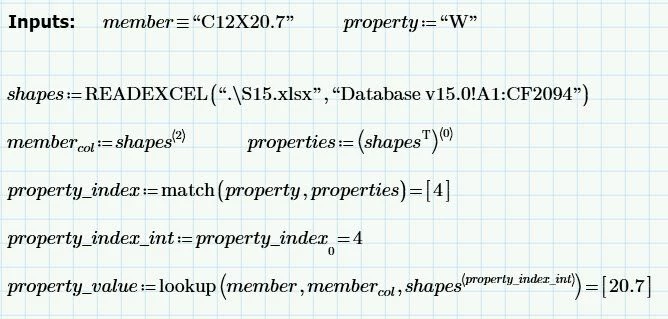


Best answer by AD_10841348

I figured it out: For anyone else who's interested. Thank you everyone who replied.


code 2.jpg

2 replies

25-Diamond I
November 5, 2023

@AD_10841348 wrote:

Currently using, Prime 9.0.0.0.


In ANY version, is there a way to have a simple database query like return "weight" from "AISC Shapes.xlsx" where "Name" = "C10x15.3"? Or workaround?


 Depends on what you consider being "simple"  😉

You may read in the table using the READEXCEL() function and then use lookup() or vlookup() to get the desired value.

-> https://support.ptc.com/help/mathcad/r9.0/en/#page/PTC_Mathcad_Help/lookup_functions.html


An alternative to using READEXCEL() is to embed the Excel sheet in the Prime file by using the Excel component. This makes the Prime file self-contained, but also larger and slower and you have to think about modifying the embedded sheet when the original Excel file is modified.


A more elaborate approach and much more work setting it up if the Excel database is larger would make usage of combo boxes as @terryhendicott  demonstrated in this thread https://community.ptc.com/t5/Mathcad/Excel-and-combobox/m-p/870154/highlight/true#M206266


21-Topaz II
November 5, 2023

Hi,

Since the thread on large combo boxes have realized you can cut and paste large data from a Prime matrix into the combo box just not into the first column of the combo box.  A large matrix can be read into Prime by READEXCEL() copied into the combo box. Matrix then deleted leaving the combo box

What is returned when you select the entry in combo box is a column vector containing that row of the matrix.

Capture.JPG

If you upload the spreadsheet we can create the combo box.


Cheers

Terry

25-Diamond I
November 5, 2023

The database has 2000+ lines.

And copy and paste is implemented in Prime in such a silly way that only the visible part of a matrix is copied.
So it seems it would be necessary to enlarge the matrix to be displayed to its full size in Prime before copy and paste would work.
Thats quite uncomfortable and maybe modifying the xml as you described in an earlier thread is even easier?
Or am I missing something concerning copy&paste a large matrix?


Next problem are the units because Primes very basic implementation of the combo boxes does not allow for combined units like kg/m.
Two possible workarounds:

a) don't use units in the combo box and add them later
b) create a custom unit like

Werner_E_0-1699215411292.png

and use this in the combo box.


25-Diamond I
November 5, 2023

Here is the implementation of the most basic way (using READEXCEL() and lookup() as already described.
Its sure not very comfortable as you have to take great care when typing in the Name to use the proper case (C10x15.3 would throw an error because of the lower case "x") and avoid typos.

Werner_E_1-1699216199357.png

10-Marble
November 6, 2023

Thank you Werner_E, I think I will be going with the last option.


However, I would like to make it a bit more automated. I'm trying to do something like the following: Create a function with two inputs (member and property) and returning property_value. I'm getting stuck with the last line of code. When I try to call the lookup function with the property_index variable instead of manually entering "4", it gives me "it's not an integer" error. I can't figure out how to change the property_index variable to an integer. Any ideas?


code.jpg

AD_1084134810-MarbleAuthorAnswer
10-Marble
November 6, 2023

I figured it out: For anyone else who's interested. Thank you everyone who replied.


code 2.jpg