3-Newcomer
February 23, 2024
Solved

Defined Variable is Unrecognized in Solver Block

  • February 23, 2024
  • 1 reply
  • 2597 views

New to Mathcad, running into an error I can't resolve. I have defined all of my matrices and variables up top, but in the solver block there are unrecognized variables. Error is: "This variable is undefined. Check that the label is set correctly." Anyone have an idea what might be going on? See screenshot below. 


Using Mathcad Prime 9.0.0.0

Best answer by Werner_E

Whenever possible you should attach the worksheet or a simplified worksheet with dummy, non-sensible data because its always hard to debug just a picture.

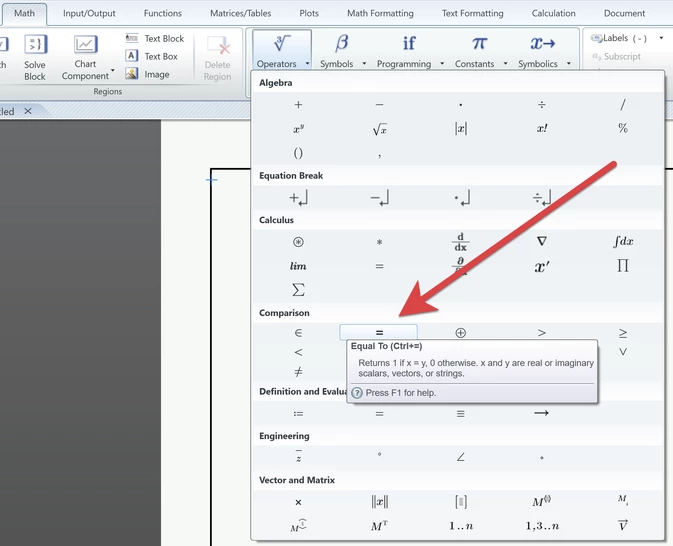
From your picture I would say that you have to use the boolean equal sign in your two constraints, not the evaluation equal as you did.

Werner_E_0-1708714583246.png


1 reply

Werner_E25-Diamond IAnswer
25-Diamond I
February 23, 2024

Whenever possible you should attach the worksheet or a simplified worksheet with dummy, non-sensible data because its always hard to debug just a picture.

From your picture I would say that you have to use the boolean equal sign in your two constraints, not the evaluation equal as you did.

Werner_E_0-1708714583246.png


3-Newcomer
February 23, 2024

Good to know, for future questions I'll attach the worksheet! Your suggestion solved the issue with the constraints, although the minerr block is still red, the error is "This function is misplaced. Move it to a solve block with one solve function only." Any ideas?

25-Diamond I
February 23, 2024

@IW_10965993 wrote:

Good to know, for future questions I'll attach the worksheet! Your suggestion solved the issue with the constraints, although the minerr block is still red, the error is "This function is misplaced. Move it to a solve block with one solve function only." Any ideas?


Not yet. You have just used the boolean equals and have put the vectors P1000 and P3000 on the right hand side?

I wonder why P1000 and P3000 are bold blue (labelled as units)  in your screenshot (maybe this was done automatically as you seem to have written them in the unit placeholders. They sure should be labelled as "Variable".

Would have to see the sheet to say more, though.

You can try to embed some dummy data in the sheet so you won't have to attach the four Excel files as well.


Just stabbing in the blue ... if you move the solve block, does the expression with "minerr" move as well. If not then its not placed inside the solve block and you should put it there via cut & paste.
Actually thats my best guess without seeing the sheet that you type the "minerr" region somewhere outside of the solve block and then just moved it there by dragging it - silly as it is this does not work. You have to use cut and paste (or retype it inside the solve block.