4-Participant
June 2, 2026
Solved

Defining a variable based on two other variables

  • June 2, 2026
  • 1 reply
  • 41 views

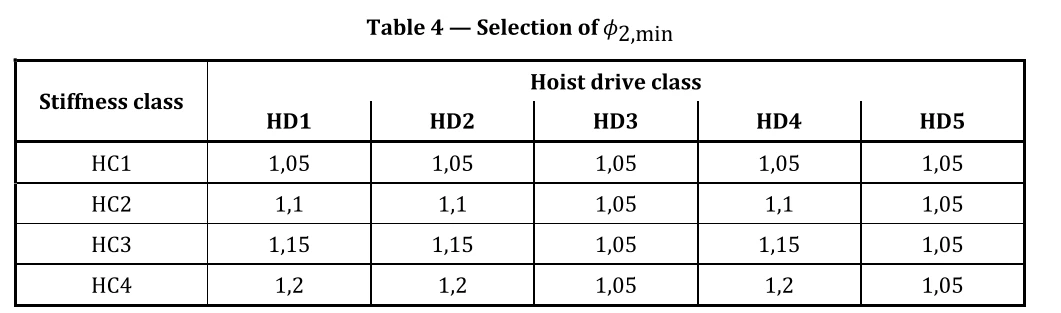
I am looking to define the variable ϕ2.min based on the table below. I have created the variables for HC and HD to define them as HC1 and HD1 etc. however I am not sure how to then pull a value for ϕ2.min based on the below selection table. 


Any advice here would be great!


Best answer by Werner_E

See the edited answer above.

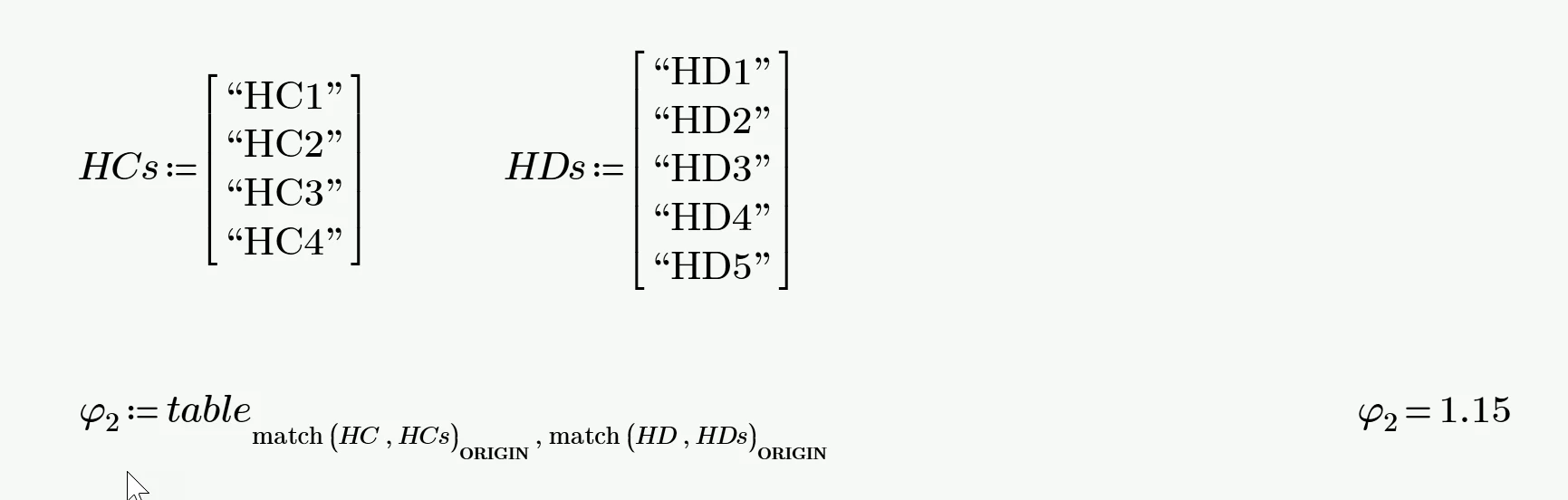
And here is a third method you may chose.

Define vectors for the text of the row and column headers and use “match” to get the correct matrix indices.

This work OK even if the headers don’t contain ascending numerical values. I guess I’d prefer this method.


1 reply

25-Diamond I
June 2, 2026

How did you define your variables for HC and HD? Numeric values (1..5) or strings like “HC1”, etc.

You should setup a worksheet with the numeric values for Phi2 in a Prime matrix and show your tries by attaching the worksheet (the lower the Prime version used for, the better).


The following examples assume that ‘table’ is the 4x5 matrix with the values of your table.

Defining HD and HC as numeric values makes it easy to extract the correct value, using HC and HD as matrix indices. As I don’t know if you changed the default value of ORIGIN (0) to something like 1, here is a version which works with any ORIGIN value:

In case HC and HD are strings, we can use the same method but we would need to extract the number and turn it into a numerical value. This can either be done by turning the string into a vector of ASCII/ANSI values, choose the third entry and subtract 48 (ASCII code for character “0”) or we could chose a substring consisting of the third character in the string and use ‘str2num’ to get its numeric value:

BTW, being lazy by nature I was cheating and used a ‘table’ with all values set to 1.15 :-)


So its always better if you attach a worksheet with whatever you have.
And don’t forget to state which version the sheet is in. For example I would not be able to open Prime 12 sheets.

4-Participant
June 2, 2026

Sorry, they are defined as strings. I tried using the if and else if functions to define it, but it got too complicated. So i resorted to just manually defining it based on the table. I may Id prefer it to automatically select it such that the possibility of human error is removed. I’m quite new to MathCad and still figuring out what it can and cant do. 

I attach my current worksheet, if that helps. 

Werner_E25-Diamond IAnswer
25-Diamond I
June 2, 2026

See the edited answer above.

And here is a third method you may chose.

Define vectors for the text of the row and column headers and use “match” to get the correct matrix indices.

This work OK even if the headers don’t contain ascending numerical values. I guess I’d prefer this method.