

1-Visitor
April 4, 2015
Solved

definite integral fails

  • April 4, 2015
  • 8 replies
  • 3395 views

Hello again,

i'm stuck with the following definitite integral:
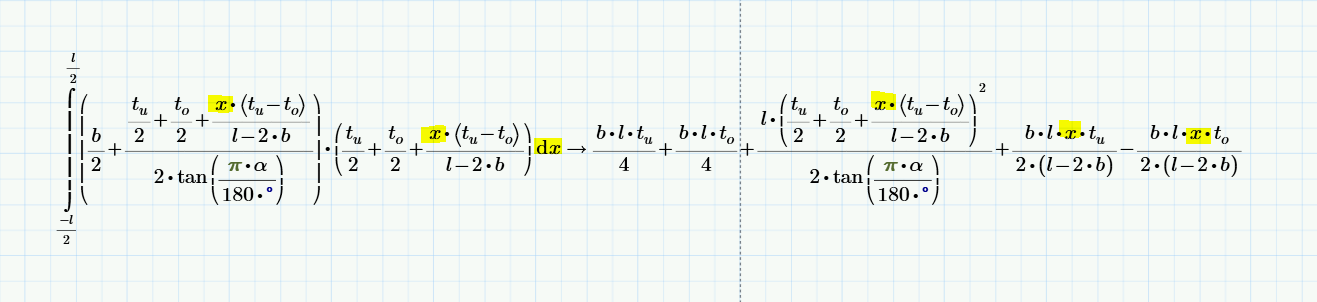
15-04-04_Screenshot Mathcad 4.PNG

As you can see, the function is quadratic in x, but Mathcad Prime isn't able to evaluate the indefinite integral as ist seems. The integration variable should not appear at the right side...

What could be the reason for this behavior?

Many thanks for any Response.

Kind regards, J. Dessecker

Best answer by jdessecker

Hello,

all this problems which i have reported in the last days seems to result in a bug: i have disabled the Multithreading-Option and this solves the problems for now.

Kindly regards, J. Dessecker

8 replies

19-Tanzanite
April 4, 2015

Try doing it as follows and then substitute for the constants a, b, c and d in terms of your own parameters (Note that my b is not intended to be the same as yours):

Integral.PNG

But I don't know why Mathcad objects to your original formulation!

Alan.

1-Visitor
April 4, 2015

Hallo Alan,

thanks for your response.

Unfortunately it works not for me. As i've paused a longer time using Mathcad, the following request: substitution syntax is

substitute, OLD=NEW

?

Kind regards, J. Dessecker

19-Tanzanite
April 4, 2015

If you want to do it all in one go then something like this?

Integral.PNG

This was done in Prime 2, but I would expect it to work in Prime 3 as well.

Alan

19-Tanzanite
April 4, 2015

Is this in a standalone worksheet, or a worksheet with a lot of other stuff that you are not showing? If it's in a standalone worksheet, please post it. If not, I assume (as before) you can't post the worksheet, but then please create a standalone worksheet with just that integral, and see if it works then.

1-Visitor
April 4, 2015

Hello Richard,

the problem appears in the worksheet you mentioned. But i'd copied this stuff as it is in the start posting in a new worksheet, an here it is.

Kind regards, J. Dessecker

19-Tanzanite
April 4, 2015

Aghhh! You have Prime 3.1, which means I can't open your worksheet, because I only have Prime 3.0 . If anyone from PTC is reading this, you really need to allow interoperability at least for minor version changes! Not being able to share a worksheet from version 3.0 to version 2.0 is bad, but not being able to share a worksheet from 3.1 to 3.0 is ludicrous!

When I retype your integral it works fine:

Since I can't look at your worksheet the only thing I can say is that Prime sees the x that's the variable of integration as different to the x that's in the kernel. It's not obvious why though. If I change x to y in the kernel I see the same answer you do (except that it has y substituted for x of course).

jdessecker1-VisitorAuthorAnswer
1-Visitor
April 7, 2015

Hello,

all this problems which i have reported in the last days seems to result in a bug: i have disabled the Multithreading-Option and this solves the problems for now.

Kindly regards, J. Dessecker