14-Alexandrite
May 30, 2025
Solved

Derive output as a Matrice

  • May 30, 2025
  • 1 reply
  • 1195 views

Hello All,


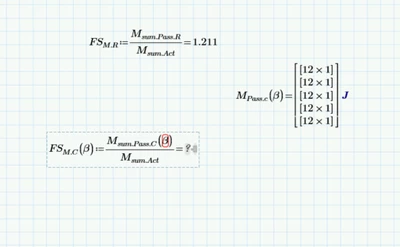
I have a mathcad project where the output is required to have in a matrice form which I am unable to. The function will work like the following, for each value of beta it will give a column of outputs and thus for the number of varibale beta, it will generate corresponding number of columns. Please help with a solution

fahmed2_0-1748564599107.png


Thanks

Best answer by Werner_E

@fahmed-2 wrote:

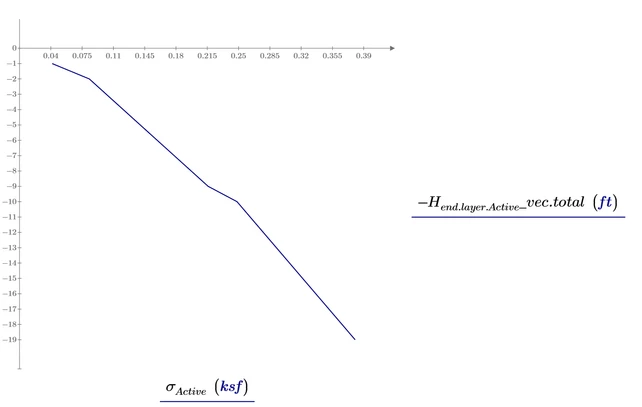
I would like the Y axis to increase from the top and end at the bottom. It means zero at the top and max value at the bottom along the Y axis


This was easy to do in real Mathcad but Primes native plots don't allow for reverse axis.

As a (unsatisfactory) workaround you could plot -H instead of H and so you get the correct plot but a wrong (negative values) scaling.
Werner_E_0-1748620706803.png


You may also want to have a look at Primes Chart component. It has much more features compared to Primes native plots. I can't say for sure if it supports reverse axis because I never use this component [EDIT: I checked and now can say for sure that you can reverse the axis]. The component is awfully slow reacting, awkward to use and very badly integrated in Prime. It does not support units and it does not respect the windows scale factor set (which makes the component virtually unusable in a setting with a small but high resolution screen and a large windows zoom factor).



1 reply

25-Diamond I
May 30, 2025

1) To create a valid matrix beta must be a vector. In your sheet beta is a range - thats something different.

You may use a userdefined function to convert a range into a vector- Once you upgrade to Prime 11 you may use the new built-in function "vec" to do this job.


2) With FS.M.C is you define a function. You cannot evaluate a function definition numerically. You have to delete the equal sign at the end.


3) To evaluate a function with a vector as function argument and expect the function to be evaluated element by element, you have to use the vectorization operator (the arrow over the expression.


Werner_E_0-1748565834092.png


Prime 10 sheet attached


Next time you ask a question please state which version of Prime you are using - especially if you are not using the latest version (which is V.11 at the time of this writing.


fahmed-214-AlexandriteAuthor
14-Alexandrite
May 30, 2025

Thank you @Werner_E  . I tried defining another variable "c" using the same transpose but it is not showing values. Can you please help on this. ALso I would like to have a plot of lateral stress distribution where the depth is in Y axis and should start from "0" from the top. Please help on this, too. My version is 10


25-Diamond I
May 30, 2025

To expand the display of nested matrices you have to uncheck the option "Collapse Nested Matrices"

Werner_E_0-1748581669830.png

I had chosen to use the transpose operator simply because of space reasons. Without using it, a lot of vertical space would have been used for the vector display.


Not sure which problem you experience with the plot. The plot at the bottom of your sheet seems to work OK.