4-Participant
June 27, 2024
Solved

Difference between range and manually entered values

  • June 27, 2024
  • 1 reply
  • 1328 views

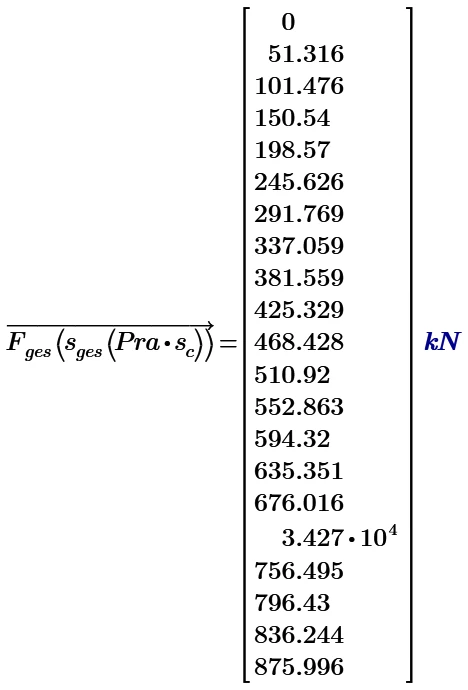
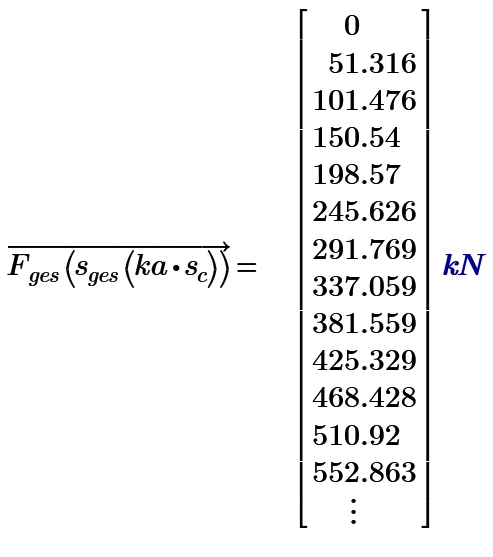
I generated a percentage range from 0 to 100% with a step of 5 percent. Since Mathcad did not want to concatenate two matrices generated this way using the augment function, I created a manually entered matrix. Here, a problem arose because the percentage range entered by different methods yields different results in calculations. What mechanism is behind this?
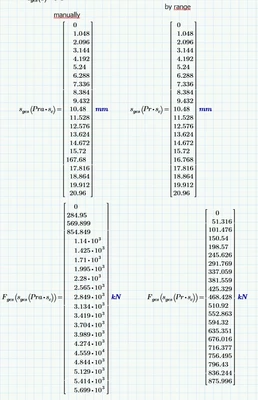
 

KP_10839346_0-1719471053956.png


Best answer by ttokoro

image.pngimage.png

1 reply

23-Emerald IV
June 27, 2024

A range is NOT a vector, so you cannot apply vector/matrix operations to it.

You define a range R for example with:

R:=1, 2 .. 9

To define a vector V with the same set of values you can use various methods. One is:

V:=matrix(9,1,max)+1

Another is:

i:=0, 1 .. 8

V[i:=i+1


Ranges are ONLY used for:

. plotting functions, the range sets the abcissa values.

. Generating vectors and matrices, see above example for the range i.

. Looping/iterations, example:

j:=3, 5 .. 7

V[j=

Should give you the set of values 4, 6 and 8.


Success!

Luc

4-Participant
June 27, 2024

Great thanks for the help, LucMeekes . Generally, I'm still puzzled as to why inserting a manually created table into the calculations or a table created using the method you suggested results in the program calculating incorrect values:


KP_10839346_0-1719479211291.png


ttokoro
21-Topaz I
ttokoro21-Topaz IAnswer
21-Topaz I
June 27, 2024

image.pngimage.png

t.t.