1-Visitor
July 25, 2016
Solved

Different result of the same formula in different worksheets

  • July 25, 2016
  • 16 replies
  • 4579 views

Dear all,

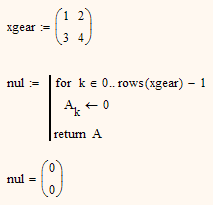
I have this very simple code that gives a different result with the same input but in a different worksheet. I can't imagine what goes wrong here. Below you can find two snippets of the code:

2016-07-25 09_57_18-Mathcad - [Torsiestijfheid.xmcd].png                         2016-07-25 09_58_05-Mathcad - [Torsiestijfheid [formularium].xmcd].png

Thanks for your help

Best answer by Werner_E

I got it!

Its the "good" old MC12 compatibility!

Local assignment were handled differently in MC12 than in MC11 and before. This stopped a lot of programs to work properly.

So in later version a compatibility switch was introduced.

Go to menu "Tools", "Worksheet Options" and chose the tab "Compatibility". Her you can change the behavior of "Local assignment result" to MC12 and this will get you the vector as result.

Nevertheless I would advice to leave the setting at MC11 and change the routine instead so its not version dependent:

Regards

Werner

16 replies

tthys1-VisitorAuthor
1-Visitor
July 25, 2016

BTW, I'm using Mathcad 15, the original worksheet is written in Mathcad 12 or 13

23-Emerald I
July 25, 2016

I suspect that the subscript k in the picture on the left is a literal subscript (type the decimal point) while the one on the right is an index (type "[" character)

25-Diamond I
July 25, 2016

Good idea, but I guess thats not the case.

You would get a simple 0 in both cases, no vector, like shown.

And then a literal sub is a bit higher than a matrix sub. In the picture both look the same.

WE

Werner_E25-Diamond IAnswer
25-Diamond I
July 25, 2016

I got it!

Its the "good" old MC12 compatibility!

Local assignment were handled differently in MC12 than in MC11 and before. This stopped a lot of programs to work properly.

So in later version a compatibility switch was introduced.

Go to menu "Tools", "Worksheet Options" and chose the tab "Compatibility". Her you can change the behavior of "Local assignment result" to MC12 and this will get you the vector as result.

Nevertheless I would advice to leave the setting at MC11 and change the routine instead so its not version dependent:

Regards

Werner

1-Visitor
July 25, 2016

Here's another assignment of nul that I assume will work regardless of your compatibility settings:

21-Topaz II
July 25, 2016

The for loop is to be used in a program with more program lines and not in an assignment statement.

for loop for Thys.jpg

25-Diamond I
July 25, 2016

> The for loop is to be used in a program with more program lines and not in an assignment statement.

Guess this does not answer the question about the different results in different sheet.

The answer is the MC12 compatibility. See my reply above.

In MC12 the program was perfectly OK the way it was written, no need to return A in an extra step.

Nevertheless I prefer the way MC11 and below handled that kind of thing (as I wrote in my first reply, the last value used is the "result" of a loop) and its sure good program style to return the vector and not the loop.

WE

21-Topaz II
July 25, 2016

But who, or what experienced programmer, regardless of the version of mathcad, would create a vector of n terms, with a for loop in an assignment statement? I believe it does not exist!

FM

tthys1-VisitorAuthor
1-Visitor
July 25, 2016

Thank you all for your valuable input. Changing the compatibility settings solved the issue!