10-Marble
October 2, 2025
Solved

Diode model plot

  • October 2, 2025
  • 3 replies
  • 1248 views

Hello,

I am trying trying plot the I/V curve on the graph of the diode model, having as example from "Simulation on Mathcad the SPICE Model of the Diode Dmbr2045mfs.pdf" by Pedro Vitoriano.

an somebody help me? 

Thank you.

Best answer by Werner_E

@Bogdan_d wrote:

Hi,

As mention in older versions of MathCAD (MathCAD 15), from what I remember square bracket have been consider as simple brackets not matrix.

No, none of the older versions of real Mathcad allowed to type in square brackets to structure expressions.

But Mathcad 15 for example used square brackets to display nested expressions

Werner_E_0-1759476930917.png

but allowed only round parentheses to be typed in.
Typing in an opening square bracket would create a vector index - in Mathcad 15 even when typed in after an operation like a multiplication:

Typing 2*[ creates  Werner_E_1-1759477148310.png

Prime usually avoids square brackets when displaying nested expressions

Werner_E_2-1759477221101.png

and typing in 2*[ creates a matrix Werner_E_3-1759477297622.png.


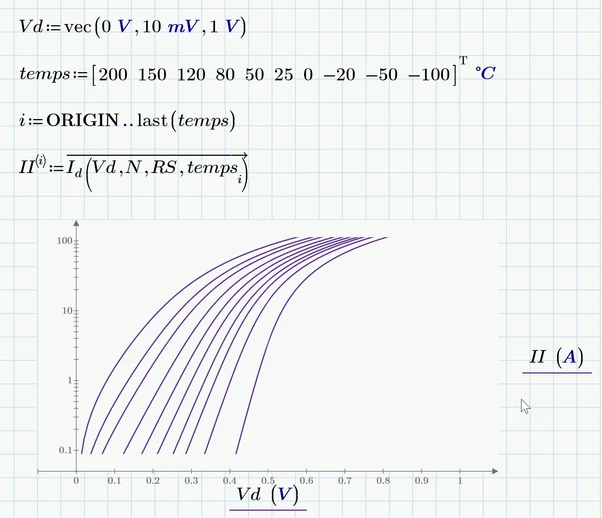
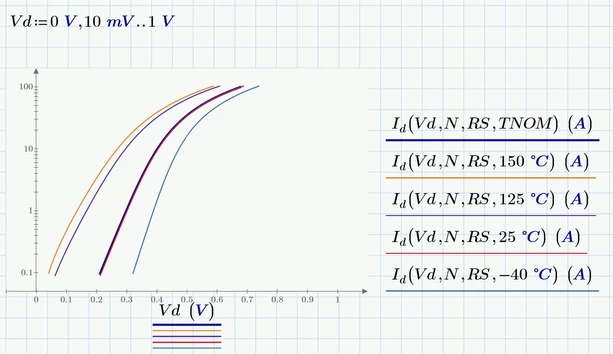
Concerning the plot you would have to use a log scale on the y-axis and manually type in 0.1 and 100 as lower and upper limit.
The result nonetheless does not match exactly the picture you posted. So either other input values were used or other formulas.

Here a pic from the version with units which I posted
Werner_E_5-1759477917191.png

or using a waterfall plot

Werner_E_6-1759478303375.png


3 replies

23-Emerald I
October 2, 2025

Using square brackets in an expression   " [  ]" causes Mathcad to define a matrix.


You should consider applying units.

Bogdan_d10-MarbleAuthor
10-Marble
October 2, 2025

I doubt this regarding brackets.

The brackets are not defined as matrix. Is a way for me to see between where I have closed them or not (old habit from old vs of MathCAD).

Nevertheless it doesn't work to change the brackets.

By the way I cannot open the file, I have MathCAD 9.

21-Topaz II
October 2, 2025

Hi

Besides the brackets, the scalar variable and function Id are the same?

Either use the Math | Style | Labels to define the appropriate definitions of variable and function to each instance of Id.

Or use different names for the variable and function.

Prime 9 enclosed.

Cheers

Terry


25-Diamond I
October 2, 2025

You may be used to using square and curly brackets for structuring, but in Mathcad, please only use round brackets for this purpose. If you type square brackets, you automatically create a matrix, which is not what you want here.


1) So replace the square brackets by parenthesis (or omit them entirely, as is sometimes possible in your sheet).

Werner_E_1-1759419008223.png

BTW, is there any specific reason why you used "t1" as name for the formal function argument and not simply "t"? Anyway, the name of the formal argument can be freely chosen, I just was curious.


2) In you solve block you wrote IS(t), but IS is a constant scalar (0.0003) and not a function. I guess you meant Is(t).

Werner_E_2-1759419121263.png


3) For plotting its better to use range with smaller increments to get a smooth plot

Werner_E_3-1759419204870.png


4) For displaying values and possible further calculations with them you should not use ranges but rather vectors! See my comments concerning the creation of the vector in the attached sheet.

Werner_E_4-1759419274031.png


Werner_E_5-1759419549128.png


Prime 9 sheet attached


Bogdan_d10-MarbleAuthor
10-Marble
October 3, 2025

Hi,

As mention in older versions of MathCAD (MathCAD 15), from what I remember square bracket have been consider as simple brackets not matrix. OK understood this topic, different version, etc. I am not working daily in MathCAD, not even not monthly. 

SPICE model for components are coming without dimension, my porpoise was to make it to work and then to add the units.

t1 no reason, was a copy from the original document mention above.

The final graph it should look like this or at least this was my end results looking for:

Bogdan_d_0-1759473565753.png

Nevertheless thank you for you response and help


Werner_E25-Diamond IAnswer
25-Diamond I
October 3, 2025

@Bogdan_d wrote:

Hi,

As mention in older versions of MathCAD (MathCAD 15), from what I remember square bracket have been consider as simple brackets not matrix.

No, none of the older versions of real Mathcad allowed to type in square brackets to structure expressions.

But Mathcad 15 for example used square brackets to display nested expressions

Werner_E_0-1759476930917.png

but allowed only round parentheses to be typed in.
Typing in an opening square bracket would create a vector index - in Mathcad 15 even when typed in after an operation like a multiplication:

Typing 2*[ creates  Werner_E_1-1759477148310.png

Prime usually avoids square brackets when displaying nested expressions

Werner_E_2-1759477221101.png

and typing in 2*[ creates a matrix Werner_E_3-1759477297622.png.


Concerning the plot you would have to use a log scale on the y-axis and manually type in 0.1 and 100 as lower and upper limit.
The result nonetheless does not match exactly the picture you posted. So either other input values were used or other formulas.

Here a pic from the version with units which I posted

Werner_E_5-1759477917191.png

or using a waterfall plot

Werner_E_6-1759478303375.png


23-Emerald IV
October 2, 2025

Apart from all other input:

You shouldn't need to define q and k. 

The electron charge is a known constant in Prime: 

LucMeekes_0-1759424503263.png

Same for the Boltzmann constant:

LucMeekes_1-1759424527584.png

You can find them in the 'Constants' panel.


But, using those you would need to use units for the other parameters as appropriate. Although that should not be a problem:

Your parameters would become:

LucMeekes_2-1759425218122.png

LucMeekes_3-1759425229843.png  

LucMeekes_4-1759425243900.png

  LucMeekes_5-1759425253111.png

LucMeekes_6-1759425282715.png 

XTI and N remain unitless.

Then: 

LucMeekes_7-1759425316223.png

and:

LucMeekes_8-1759425340019.png

LucMeekes_9-1759425350793.png


Success!
Luc


25-Diamond I
October 2, 2025

Added units in my sheet according to Luc's suggestion