

1-Visitor
October 4, 2012
Question

Diplaying symbols incorrectly

  • October 4, 2012
  • 5 replies
  • 1764 views

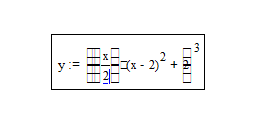
I’ve just reinstalled MathCAD 15, but it won’t display certain symbols such as the multiplication dot, parentheses that encompass a fraction, integrals, etc. I’ve included a screen shot of the problem I’m having and am hoping it can be solved.
mathcad+problem.png

What I’ve just tried to type into the sheet is y:=((x/2)*(x-2)^2+2)^3

I've no clue why it's started doing this.

Any help is greatly appreciated.

5 replies

19-Tanzanite
October 4, 2012

This has been seen before, many times. The symbol font is probably corrupted. Delete the existing one (symbol.ttf) from the Windows/fonts folder, and then drop a new copy of the font into the same folder to reinstall it.

1-Visitor
October 4, 2012

I went into C:/Windows/fonts but am unable to find that file you specified...

Where would I get that font to put into the folder?

And thanks for helping!

19-Tanzanite
October 4, 2012

Here's a copy.

Under Windows 7 the font will appear as "Symbol regular". I should qualify what I said by adding that I have never tried to replace the font under Windows 7. Still, if it's not there then you have nothing to lose by dropping the font into the folder to see what happens! Under XP, if it was successful it will tell you it was installed, and I assume it will also do that under Win 7.