1-Visitor
December 21, 2015
Solved

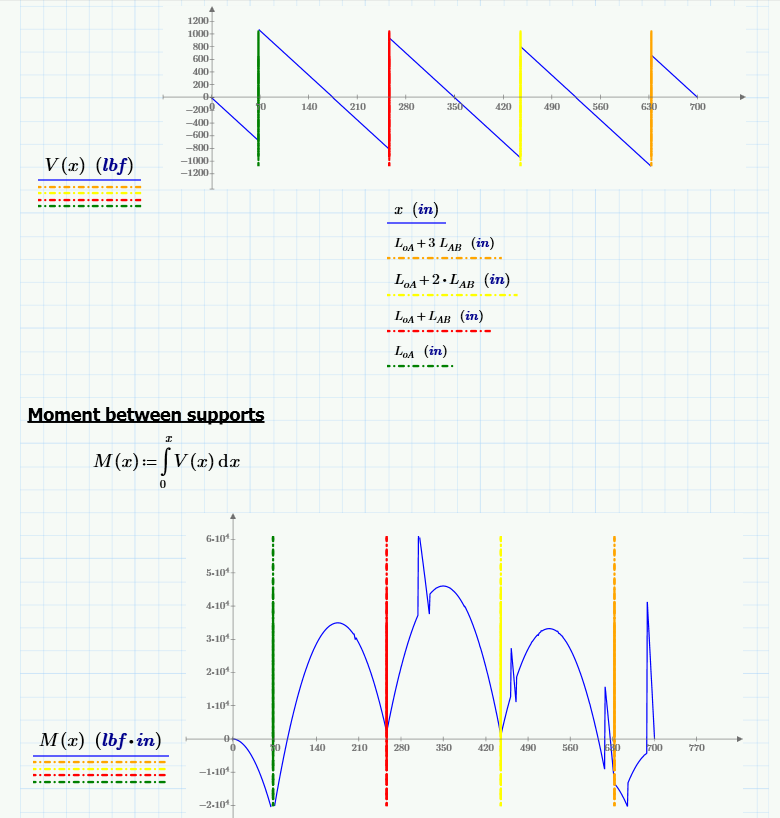
Discrepancies in moment diagram when integrating shear equation

  • December 21, 2015
  • 28 replies
  • 9513 views

When integrating my shear equation, the moment diagram shows occasional discrepancies along an otherwise expected curve.break.png
Best answer by MJG

Thanks for posting.  Unfortunately, I can't find anything to explain the problem.

Attached is an alternate method of solving for M(x) which appears to eliminate the problem.

28 replies

1-Visitor
December 21, 2015

Can you post an image of your definition of V(x)?  I can't open your Prime file.

1-Visitor
December 21, 2015

Try defining a range variable over which to graph:

creed-21-VisitorAuthor
1-Visitor
December 21, 2015

Here's the first part of the file:

copy2.png

1-Visitor
December 21, 2015

Have you tried adjusting the increment of x?  E.g. x:=0in,5in...L

creed-21-VisitorAuthor
1-Visitor
December 21, 2015

Here's what an increment of 0.1" looks like. Interestingly, this took ~31s to compute. I gave up waiting on a 0.01" interval.

dd.png

Here's a 10" interval:

gg.png

creed-21-VisitorAuthor
1-Visitor
December 22, 2015

Here's an excel export of the 10" interval. Discrepancy's are highlighted. (I don't see an option to upload a file other than an image or video here??)

kk.png

25-Diamond I
December 22, 2015

Its a bad habit to use the same variable as variable of integration AND as upper limit like you did in the definition of M(x). But I don't think that that has anything to do with the effects you encounter.

Unfortunately I can only open P3 and not P3.1 files, too, so I can't play around with your sheet.

Have you tried to change the values of TOL and CTOL ?

WE

According uploading files: If you choose "Use advanced editor" at the upper right of the answer window, you get at the lower right an option to attach files.

creed-21-VisitorAuthor
1-Visitor
December 22, 2015

I made a legacy file I can attach but am not seeing the "Use advanced editor" option...what am I missing? lol

fdfd.png

25-Diamond I
December 22, 2015

Christopher Reed wrote:

I made a legacy file I can attach but am not seeing the "Use advanced editor" option...what am I missing? lol

I have no idea - it should be there as you can see in the attached (and not included) picture.

I see that you are missing this option and I am also confused as at the bottom of the previous message in your pic you have  Action at the left and Like and Reply at the right. As you can see I have it just the other way around.

Could it be browser specific? Maybe you try a different browser. I am using Firefox which has the additional advantage that I can insert pictures in my posts directly from the clipboard and do not have to save them to disk first.

Maybe you should open a discussion/question here -> PTC Community Help or write a PM to Ryan Kelley . But I think PMs no longer exists since the last change of forum design (worse by design, not by accident).

Another way to get the advanced mode used to be to send your message and immedeatly reopen it to edit it. This used to bring up advanced mode automatically - give it a try.

25-Diamond I
December 22, 2015

I just notice that nothing happens when I click on the picture a attached in the last post.

A small windows saying "loading" opens for a short time, closes and nothing else happens.

This is not how it should be.

But right clicking the link to the picture and chosing "target save  as" works.

Maybe soemthiong is wrong with this forum software at the time ?

Anyway, here ist the picture inserted:

Adv1.png

Adv1.pngWOW! Same effect! When I try to insert the saved pic via the buttton, nothing happens!

Lets see if I can do directly via clipboard:

seems to have worked.

WE

creed-21-VisitorAuthor
1-Visitor
December 22, 2015

Here we go! IE and Chrome weren't showing the "Use advanced editor" link. I downloaded Firefox and there it is. Here's the file, thanks for taking a look!

19-Tanzanite
December 22, 2015

The difference is in how you reply, not the browser. If you reply directly from your inbox, you see the dialog you showed with no option for the advanced editor. If you go to the thread, and then reply from there, you see a different dialog, with an option for the advanced editor. It's really confusing.

1-Visitor
December 22, 2015

That's correct, if viewing the discussion in the community "Inbox" there is no way to proceed to the "Create Advanced Comment" page. If you need to attach a file you'll need to visit the discussion directly by selecting the title of the discussion to visit the permalink and add your reply.

Screen_Shot_2015-12-22_at_12_07_37_PM.png
