
1-Visitor
November 6, 2017
Solved

displaying (and exporting) the formula of a function

  • November 6, 2017
  • 2 replies
  • 3958 views

Hello all,

Hopefully this is something you could help me with. I am using Mathcad14, but I do have access also to Mathcad15 if needed (but not any Prime versions).


Suppose I have a sheet with this simple function:

a(b,f):=b+f


I need to:

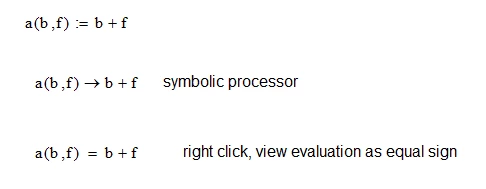
a) display again lower in the sheet the exact formula of function a (meaning, I want to be able to type somewhere lower in the sheet "a(b,f)=" and then for Mathcad to automatically add after this "b+f")


b) I want to "export" a(b,f):=b+f (or even at least b+f) as a string to a file (excel preferrably)


I do have some (limited) scripting ability and I did manage to export data to excel files, but I can only do so with strings or simple variables. I have not found yet a way to do this for formulas. I am not even sure if it is possible. I do realize "formula to string" is a BIG thing, due to the many possible formats a formula may appear as, but atm I am really dealling with very simple expressions, like a*b+c (single row, basic operators).


Best regards,

Cristian


P.S. I would even be happy if I could export (through a script)  the specific a(b,f):=b+f math region to clipboard as a picture and then (still through the script) paste it in excel, if that is easier.
Best answer by Fred_Kohlhepp

You can use the symbolic processor (in 14 aand/or 15) to do this:

equals.PNG

Note that if you have assigned values to b and f you will need to put b:=b and f := f above the symbolic values.  If you right-click on the symbolic expression you can alter its appearance.


Exporting to a file or EXCEL is more problematic.

2 replies

23-Emerald I
November 6, 2017

You can use the symbolic processor (in 14 aand/or 15) to do this:

equals.PNG

Note that if you have assigned values to b and f you will need to put b:=b and f := f above the symbolic values.  If you right-click on the symbolic expression you can alter its appearance.


Exporting to a file or EXCEL is more problematic.

23-Emerald IV
November 6, 2017

The first part is easy. Make sure b and f are undefined at the point where you wnat to display the function definition of a (e.g. by undefining them with b:=b and f:=f),. Now you can display the definition of a with the symbolic evaluation:

a(b,f)->


You find the symbolic evaluation operator '->' on the symbolic operators pad, or using the keystroke [Ctl]. (That is pressing the Ctl key down and while it is pressed down, hitting the '.' key.)


The other part is very difficult, if not impossible. You cannot determine from any variable a string containing its name.


Success!
Luc

23-Emerald IV
November 6, 2017

As said, the expression (variable or function) to string conversion is not available in Mathcad, although it has been asked for.

The other way around was found over 10 years ago , but only works in mathcad 11 (not before, not after).

This is what it can do:

LM_20171106_Str2exp.png

That way you can even import an expression contained in a string from excel, and convert it to a mathcad expression.


Luc