
13-Aquamarine
August 24, 2023
Solved

Echo an equation

  • August 24, 2023
  • 3 replies
  • 4377 views

This should be simple.  I have an issue where I define an equation and get a useful result.  But further down in the mathcad sheet I just need to echo the equation that defines the variable to the user so he can make other determinations from the equation.  How do I do that?  See attached.


I need the means to do this in Mathcad 15 and in Prime 8.0.


Best answer by LucMeekes

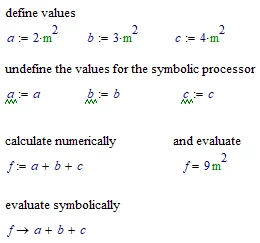
In (real) Mathcad, like this:

LucMeekes_0-1692979207130.png

Success!
Luc


3 replies

ttokoro
21-Topaz I
21-Topaz I
August 24, 2023
From help page of explicit.
 
5.To perform the above numeric calculation without using explicit, use the clear.sym function to clear the symbolic values of all variables:


6.Use explicit to display formulas in terms of variables, without substituting values for the variables defined elsewhere in the worksheet:


t.t.
13-Aquamarine
August 25, 2023

I see how this may be used.  I don't see the mechanics of how to implement it Mathcad 15.  See below example in Prime 2.0 in attachment

ttokoro
21-Topaz I
21-Topaz I
August 25, 2023

image.pngimage.pngimage.pngimage.png

t.t.
23-Emerald I
August 25, 2023

Do you mean like this?

Fred_Kohlhepp_0-1692967827997.png

  • Copy the equation, paste below..
  • delete the trailing evaluation " ="
  • REPLACE the defining " := " with the boolean comparison equal " "

Works in any Mathcad.

LucMeekes23-Emerald IVAnswer
23-Emerald IV
August 25, 2023

In (real) Mathcad, like this:

LucMeekes_0-1692979207130.png

Success!
Luc


13-Aquamarine
August 28, 2023

No success yet.  See attached.  Maybe there is a default in Mathcad 15 that needs to be set?

25-Diamond I
August 28, 2023

Hope this helps:

Werner_E_0-1693241806448.png


MC15 file attached