
17-Peridot
July 30, 2024
Solved

Embedded Excel file issue in Mathcad 10

  • July 30, 2024
  • 1 reply
  • 2904 views

Hi guys,


I'm having issues with embedded Excel files. 

After opening a Mathcad Prime 10 file with an embedded Excel file (from which I'm reading in data for calculation) MC suggests that I might be editing the Excel file and thus the calculation can't continue; see screen shot.

Has anybody experienced the same issue and (hopefully!) a solution to the problem?
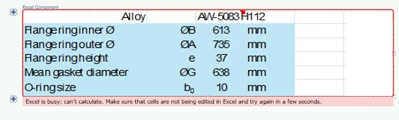
Raiko_0-1722331830902.png

Some more information:

  • Win 11, 64 Bit machine.
  • MathCad Prime 10
  • Checked Task Manager for background Excel files running - none.
  • I've deleted the Excel file and "re-embedded" a new one - same issue.
  • New Mathcad file with new embedded Excel file - same result.
Best answer by terryhendicott

OS Name Microsoft Windows 11 Pro
Version 10.0.22621 Build 22621

Kept up to date.

Excel 2019

Prime 10

All seems to be fine

Cheers

Terry

1 reply

21-Topaz II
July 30, 2024

Hi,

I have tried with a very large Excel file and all is well on my system.

Can you uplaod the Prime sheet with the problem?

Cheers'Terry

21-Topaz II
July 31, 2024

Hi,

Try turning off multithreading calculations

Capture3.JPG

Raiko17-PeridotAuthor
17-Peridot
July 31, 2024

Hello Terry,


thanks for your advice, but switching off multithreading doesn't work.


I've attached the "offensive" Mathcad sheet. It worked before, but since Monday it started misbehaving. Perhaps it is due to our companies switch to Win 11..


Thanks 


Raiko