4-Participant
January 13, 2022
Solved

Enter "NaN" via excel component

  • January 13, 2022
  • 1 reply
  • 4567 views

Hi!

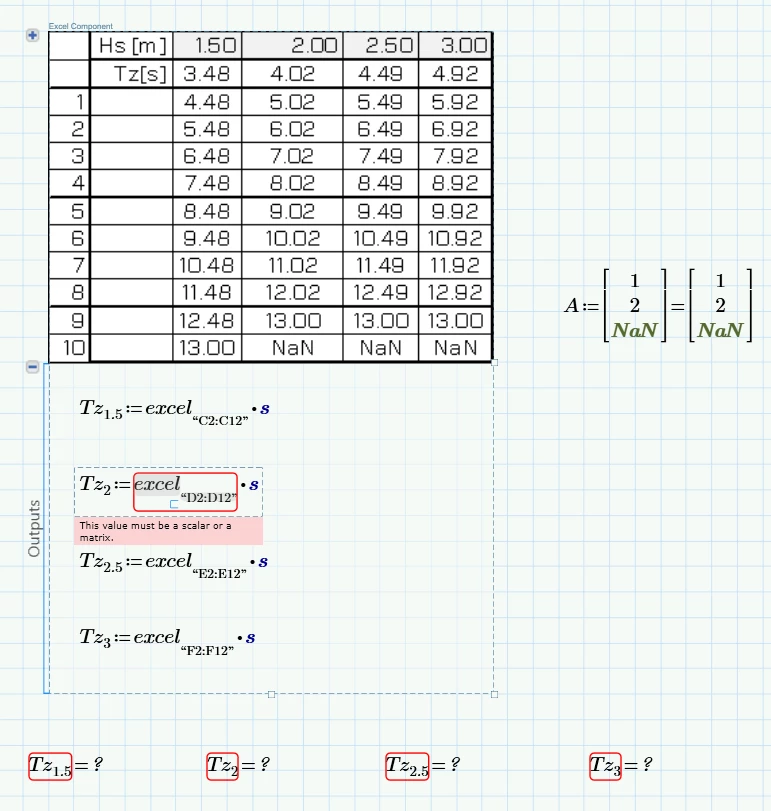
I have written som output in the excel component, and I would like to define a few values as "NaN" (they are out side my range of interest), but the excel component does not appear to accept NaN from excel. Are there any workarounds?


Thank you! (using MC P7)


ExcelNaN.PNG

Best answer by Werner_E

The reason for the error is because Excel does not support a variable for "not a value" and treats the NaN in your spreadsheet as normal Text.

When you read that in in Prime you try to multiply that text by a unit (seconds) which causes Prime to throw the error.

A solution can consist in not assigning the unit in the Excel component but rather replace the "NaN" by NaN after reading in the columns and only then add the units.

Here is a small function which replaces any string for a NaN. You call it vectorized and add the unit:


EDIT: I am not allowed to embed a picture in this posting because the system says that I reached my image upload limit. Thats silly! Images embedded in a posting should not be automatically added to my "gallery" but rather be connected to the specific reply like attachments are.

So I have to attach the pic - hope this will work.


The routine as shown replaces EVERY cell with a string/text in it by a NaN.

If you'd rather just look for a specific string like "NaN" you would use Str2NaN(v):=if(v="NaN",NaN,v) instead.

 

1 reply

Werner_E25-Diamond IAnswer
25-Diamond I
January 13, 2022

The reason for the error is because Excel does not support a variable for "not a value" and treats the NaN in your spreadsheet as normal Text.

When you read that in in Prime you try to multiply that text by a unit (seconds) which causes Prime to throw the error.

A solution can consist in not assigning the unit in the Excel component but rather replace the "NaN" by NaN after reading in the columns and only then add the units.

Here is a small function which replaces any string for a NaN. You call it vectorized and add the unit:


EDIT: I am not allowed to embed a picture in this posting because the system says that I reached my image upload limit. Thats silly! Images embedded in a posting should not be automatically added to my "gallery" but rather be connected to the specific reply like attachments are.

So I have to attach the pic - hope this will work.


The routine as shown replaces EVERY cell with a string/text in it by a NaN.

If you'd rather just look for a specific string like "NaN" you would use Str2NaN(v):=if(v="NaN",NaN,v) instead.
 

4-Participant
January 13, 2022

Thank you very much @Werner_E ðŸ˜€
