
1-Visitor
Apr 2, 2015 9:53 PM UTC
Solved

Equals to and CTL+=, and fraction numerator / denominator

Hello there,

Has been a long time since I use prime, but there is some shortcuts that Idon't know how to do it:

  1. Equals to, like CTL + =

Its like impossibrl becouse o use = on my PC its SHIFT + 0, and I try CTL+SHIFT+0 and CTL+0, what i'm doing wrong?

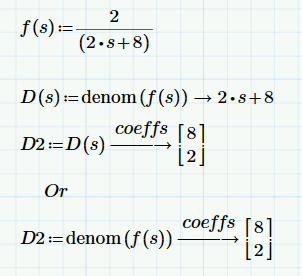
One more thing, I have a fractions like 2/(2s+8), how can I choose numerator or denominator?

regards,

LL
RichardJAnswer
19-Tanzanite
Apr 3, 2015 1:54 PM UTC

5 replies

19-Tanzanite
Apr 2, 2015 10:38 PM UTC
  1. Equals to, like CTL + =

Its like impossibrl becouse o use = on my PC its SHIFT + 0, and I try CTL+SHIFT+0 and CTL+0, what i'm doing wrong?

I think Prime has some issues with shortcuts for non-English users. Being an English user, I can't help more than that though.

One more thing, I have a fractions like 2/(2s+8), how can I choose numerator or denominator?

Do you mean how do you separate them? Use the functions numer and denom with the symbolic processor.

Translate
1-Visitor
Apr 3, 2015 11:13 AM UTC

Hello, yes I mean use it for symblic processor.

For examples, I have 2/(2s+8) then -> denominator -> coeffs.

Like type a function and then use only numerador or denomintar using symbolic expressios.

Translate
RichardJ19-TanzaniteAnswer
19-Tanzanite
Apr 3, 2015 1:54 PM UTC

Translate
24-Ruby IV
Apr 3, 2015 9:15 AM UTC

Switch your keyboard into English layout and use the keyboard shortcut "Ctrl+=".

Translate
1-Visitor
Apr 5, 2015 10:16 AM UTC

Hey,

I try on my PC keyboard English from UK and USA, and don't work.. I don't use much this key, but thank you for your help.

Regards, LL

Translate