
1-Visitor
November 1, 2015
Solved

Equation Sheet

  • November 1, 2015
  • 5 replies
  • 6592 views

Hello

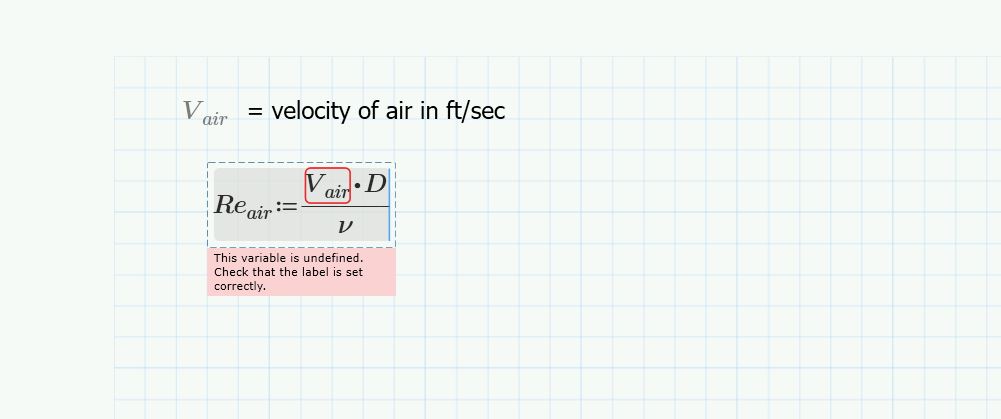
I need to make an equation sheet of all these formulas I am using for a project for my Professor.  Mathcad is so nice to do this procedure. However, Mathcad 3.1 Prime wants to calculate it.  I don't need it to calculate it. I just need to show a list of formulas without calculations and without having a variable undefined. if someone could help me with I would be greatly appreciated.  You can see in the picture below to see what I am talking about. formulas.JPG
Best answer by Fred_Kohlhepp

Use "cntrl =" instead of "shift :"

The constraint (Boolean) equals will not evaluate and will not complain about undefined terms.

5 replies

1-Visitor
November 2, 2015

One solution would be to define all your variables in the non-printed region to the right (use "draft view" instead of "page view").

23-Emerald I
November 2, 2015

Use "cntrl =" instead of "shift :"

The constraint (Boolean) equals will not evaluate and will not complain about undefined terms.

1-Visitor
June 8, 2023

8 years later, and you saved me time 🙂

Thank you sir!

23-Emerald V
November 2, 2015

Robert Payne wrote:

Hello

I need to make an equation sheet of all these formulas I am using for a project for my Professor.  Mathcad is so nice to do this procedure. However, Mathcad 3.1 Prime wants to calculate it.  I don't need it to calculate it. I just need to show a list of formulas without calculations and without having a variable undefined. if someone could help me with I would be greatly appreciated.  You can see in the picture below to see what I am talking about.

Either of Mark's or Fred's methods will work.   I'd probably go for Fred's method as it's less work.  Another option is to define your equations as normal, but *first* turn off auto-calculation.   This gives you an advantage in that you can just copy & paste them from the formula sheet to your working sheets without modification.   They do have a greyed-out appearance, but this might not matter for just an equation list.

Stuart

23-Emerald I
November 2, 2015

Note that velocity does not have to be in ft/sec, the equation for Reynold's Number results in a unitless quantity.  Inputing the three variables in any combination of valid units (since Mathcad auto converts units will result in the same value:

Entering an incorrect unit will prompt Mathcad to supply a correction

rpayne1-VisitorAuthor
1-Visitor
November 7, 2015

Thank You. That works very well. I am not sure what the other person said about page view I couldn't find anything like that. 

I am having a lot of problems with the Temperature and dollar amount.  I read that mathcad only does absolute temperatures ( R, K).  I tried using the few examples in a post to define Fahrenheit and I ended up with errors not sure what I was doing wrong. I am learned that the best time to learn something new is when you are trying to complete a project.

Thank you for your help.

23-Emerald V
November 9, 2015

Robert Payne wrote:

Thank You. That works very well. I am not sure what the other person said about page view I couldn't find anything like that. 

Prime has two document display modes: Page and Draft.  Page shows what Prime will print, whilst Draft allows you to access more non-printing pages to the right of the printable pages.   You can toggle between the two modes by either using the Page and Draft button in the Document tab on the Ribbon or by using the Page and Draft buttons at the right of the status bar.

Stuart