
1-Visitor
September 23, 2015
Solved

equations for diffrent boundary condition and one result

  • September 23, 2015
  • 22 replies
  • 8001 views

Hello Guys i have easy task to solved on paper even but can't find the proper code in Mathcad for it.

The main task is really simple :

A horizontal force of P = 100 N is just sufficient to hold the crate from sliding down the plany, and a horizontal force of P= 350N is required to just push the crate up the plane. Determine the coefficient of static friction between the plany and the crate, and find the mass of the crate.

I don't want go deeper in technical aspect of this easy taks to calculate. The problem is in Matchad and my limited knowledge. How to set in equations with diffrent P value and find the solution in Mathcad?

My work is seen below. But it's not going to work.
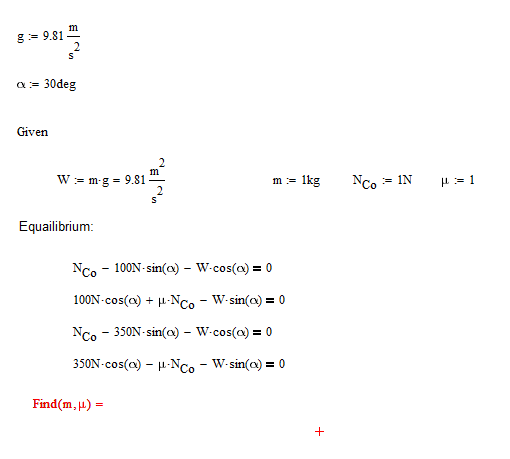
22.PNG

The think is probably that i don't know how to use the result from two first equation and moved it to the next two to get the final result of it. Of course still don't know why for Mathcad the value of mi and m is as undefined...
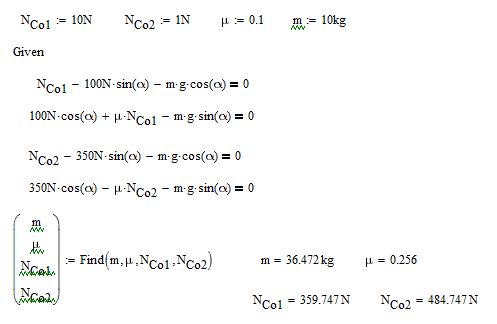
Best answer by RichardJ

Like I said, the equations are different. First two equations, what is NCo? It's not 1N. Second two equations, what is NCo? It's also not 1N, and it's not the same as the NCo for the first two equations. So now you have 4 equations and 4 unknowns:

22 replies

19-Tanzanite
September 23, 2015

Make W a function of m

W(m):=m*g

Since you have only two unknowns, you only need two equations, for example the first two.

15-Moonstone
September 23, 2015

Hello

You do not need to g: = 9.81 m/s ^ 2, for g in MathCad is already the gravitational constant.

If you type in a blank page g = you 9.81 m/s ^ 2.

Kind regards.

Denis

lnadolny1-VisitorAuthor
1-Visitor
September 24, 2015

Thank you guys but I still don't have the results :

And still i'm courious how to built in the Mathcad those two equations for each of condition and connect them to get the final result. And i also think you're wrong that 2 equation in this case is okay, because the statment for the second condition change also.

22222.PNG

24-Ruby IV
September 24, 2015

Send please the sheet

lnadolny1-VisitorAuthor
1-Visitor
September 24, 2015

Here you go:

19-Tanzanite
September 24, 2015

If W is defined as a function then you have to use it that way, not as a variable.

You can't just evaluate the Find, because the return units for m and mu are different. You have to assign the results to two variables, and evaluate them.

If you have two unknowns then you cannot have more than two equations. That would be an over-determined system, and in general will have no solution. In this case the values of m and mu that satisfy the first two equations are not the same as the values that satisfy the second two equations.

lnadolny1-VisitorAuthor
1-Visitor
September 24, 2015

Thank you for your time. I will really appreciate if you will explain me some things about those calculation you made.

First of all and the most important is that the answer is still not correct so I don't understand what calculate Mathcad. The result that meet those two requirements are:

m=36,46kg and mu= 0,256

1. First I don't understand why you evaulate the equations : with this results?

22222222.PNG

2. I don't understand those lines specially with find command :

ssss.PNG

Because okay we evalute the equailibrium it's okay. But i don't get why why have this M and mu in this bracket the we assign the command to it like find m and mu. Of course i was curious and trying to add the equal after command but I find that i will receive an error. So i don't even understand why seperatly it can give us value for each one.

So beasiclly from the step 2 you have values that meet first condition based on Mathcad knowledge.

3. Now you have those lines :

cvxvcv.PNG

It's looks like you calculated the equation based on your results from the step 2. But what was the purpose of that? You still have diffrent condition for equation 3 and 4 to meet.

4. Then you have those second condition to calculated. Therefore you put another 4 equation with some strange results. And as I mentioned there is no proper final answer for this exercise. Don't understand also why you put 4 euqations on the downside once again.

dsfs.PNG

Could you help me with understanding? And maybe find the mistake why it's not give the right answer?

23-Emerald V
September 24, 2015

Lukasz Nadolny wrote:

Thank you for your time. I will really appreciate if you will explain me some things about those calculation you made.

First of all and the most important is that the answer is still not correct so I don't understand what calculate Mathcad. The result that meet those two requirements are:

m=36,46kg and mu= 0,256

Sorry, I haven't looked through the entire thread but just looked at Richard's worksheet.   Are you sure those values you give are correct?  Given the equilibrium conditions in the worksheet, I don't think there is a pair of m and μ values that give equilibrium for both 100 N and 350 N.

Stuart

lnadolny1-VisitorAuthor
1-Visitor
September 24, 2015

Thank you I will fallow your calculation and then i will have some question if you wouldn't mind. But you are right there is one mistake in equailbrium you should have those 4 :asdasdasdasd.PNG

(diffrence in minus and plus sign) and then yes i'm sure because I calculated by hand.

23-Emerald V
September 24, 2015

Lukasz Nadolny wrote:

Thank you I will fallow your calculation and then i will have some question if you wouldn't mind. But you are right there is one mistake in equailbrium you should have those 4 :asdasdasdasd.PNG

(diffrence in minus and plus sign) and then yes i'm sure because I calculated by hand.

I've probably mistyped something, because I still don't get the values you do.  I've replaced the = 0 equilibrium values in a solve block with the = values you give above to see if the expressions can find the corresponding m and μ values - it seems to, giving confidence the solve block is correctly set up.

Stuart

lnadolny1-VisitorAuthor
1-Visitor
September 24, 2015

Okay I fallow your calculation. Some questions:

1. What is this :

asdasdasd.PNGBecause the mass have units in kg, and you have in bracket m over kg so what that mean?.

2. Could you explain this :

dddd.PNG I don't understant this and what it mean in Mathcad.

3. How the result from the first equation is transfer to compare this with second condition and get the proper answer?

23-Emerald V
September 24, 2015

Lukasz Nadolny wrote:

Okay I fallow your calculation. Some questions:

1. What is this :

asdasdasd.PNG

Because the mass have units in kg, and you have in bracket m over kg so what that mean?.

As Richard explained, although Find will return an expression with mixed unit, Mathacad 15 can't assign mixed unit values to a single array; arrays must all be of the same quantity.    Richard provided one way round this by assigning the output from the Solve function to independent variables.   Another way round it, which I've used, is to make all the results of the same quantity (usually dimensionless) and you do this by dividing each quantity by the appropriate unit

Dividing m by kg makes it dimensionless, which means that I can now assign the Find result to a variable or function.  In this case, I've assigned it to a function, h, which takes a single argument a that gets passed into the solve block.

2. Could you explain this :

dddd.PNG

I don't understant this and what it mean in Mathcad.

Function h returns a dimensionless 2-element vector.  I simply do the same thing Richard did and assign each element to m and μ respectively. You should have noticed that I multipy m by kg to restore its unit.

The advantage of using a function with a solve block is that you don't have to write a new solve block every time you want to add a new value of a parameter.

3. How the result from the first equation is transfer to compare this with second condition and get the proper answer?

Unfortunately, I don't know what your question means.   Could you explain it in a bit more detail? 

If you mean how does the second solve block know what values of m and μ to use, then as Mathcad works from left-to-right and then top-to-bottom, it simply picks up the current values of m and μ, which happen to be the last ones used.  It doesn't matter too much what the values were for this purpose - they just had to produce different values for F, G and H so that I could demonstrate that the solve block found values that produced eq1, eq2, eq3 and eq4 (ie, that the solve block works!).

Stuart

lnadolny1-VisitorAuthor
1-Visitor
September 24, 2015

That's how i calculated this by hand and still it's correct.

Here you go :

aaaaaaaa.PNG

Could you be so nice and also answer my previous question about the mathcad? Post above? Thanks guys for patient.

RichardJ19-TanzaniteAnswer
19-Tanzanite
September 24, 2015

Like I said, the equations are different. First two equations, what is NCo? It's not 1N. Second two equations, what is NCo? It's also not 1N, and it's not the same as the NCo for the first two equations. So now you have 4 equations and 4 unknowns:

lnadolny1-VisitorAuthor
1-Visitor
September 24, 2015

Nco it's called Normal Force. And yes it's not 1 Newton. I just add this Co to have distinquish between Newtons and Normal Force, because I still struggle with notation in Mathcad. I do mistake that Nco is diffrent in second couple of equations i wasn't see it on paper becasue it was eleminated anyway during the solving.

Thank you guys for helping me understanding Mathcad solving task. I gain a lot of knowledge. Thanks to you all.

lnadolny1-VisitorAuthor
1-Visitor
October 4, 2015

And one more thing not so important but still:

Why always after i saved the Mathcad file and back to it once again. The text is messed up and sometimes wrapped?

00.JPG