15-Moonstone
August 12, 2021
Question

Error Calculating

  • August 12, 2021
  • 5 replies
  • 7544 views

Dear all

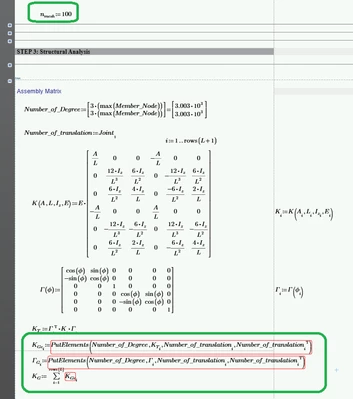
I try to divide element matrices but when I use n=100 , program error.
Do have any methods/solution to avoid this problem?
Thank u

SPRstructur_1-1628761960093.png


5 replies

23-Emerald IV
August 12, 2021

It probably will not solve your problem, but instead of

i:=1..rows(L+1)

You might want

i:=1..rows(L)+1

A small step for a parenthesis, but a big difference for i.


Success!

Luc

15-Moonstone
August 12, 2021


  I want , i:=1..rows(L)  not about this. but the problem is as picture above program can not store big data when try n_mesh=100.
SPRstructur_2-1628765334042.png


ttokoro
21-Topaz I
21-Topaz I
August 12, 2021


The first one is 6*6, however, the others are 3003*3003, that all data=0 except the 1,1 to 6,6.

Therefore, if you use only 1,1 to 6,6 data only, memory error may disappear. 


image.pngimage.pngimage.pngimage.png

t.t.
21-Topaz II
August 13, 2021

Hi SPRstructur,


Can you draw a diagram of the structure you are analyzing?


Cheers

Terry

15-Moonstone
August 13, 2021

It working well for my sheet I mesh below 50. the problem is when I try to mesh more than 50 Elements Program cant store big data. Program error because my formula.
As pic below is work normally but in low mesh make the result not accurate. Can suggest any method or solutions or modified my sheet avoid problem above?
Thank u

SPRstructur_1-1628857777038.png


21-Topaz II
August 13, 2021

Hi,

Can you share the worksheet with the full working including the diagrams.  I will then look at it.


In your earlier shared sheet when I make the change suggested by Luc and set to 100, I get no memory errors but it takes a while to assemble global stiffness.

Capture.JPG

Capture2.JPG

Capture3.JPG

Cheers

Terry


21-Topaz II
August 13, 2021

Hi,

Have calculated the worksheet while at the same time used task manager to keep track of the memory used.  It works on my machine but I am running 128GB of Ram and 32 cores for music production and video editing.  The worksheet uses at peak around 114 GB and after calculation around 92 GB. So it works on my machine (just).

Your method of assembly looks to be create 1000 global stiffness sized matrices of zeroes with a small area 6 by 6 with the element transformed stiffness matrix inserted and then you sum them.  This is very memory intensive and there is a better way.  You need to keep only one global stiffness matrix, and the required number of elemental transformed stiffness matrices and assemble global by using indices that reflect the connectivity of the structure.  Far less memory is needed.

Capture.JPG

Capture2.JPG

Capture3.JPG

Upload you latest file and let me have a look.

Cheers

Terry

21-Topaz II
August 13, 2021

Hi,

OK worked on the original posting worksheet.

Made two changes to the calculation of KG that only keeps one global stiffness matrix.

One the calculation of the PutElements function so the elemental matrix data is added to the one global matrix

Capture.JPG 

Two the definition and calculation of KG itself

Capture2.JPG

The worksheet peaks at 2.1 GB and finishes at 1.4GB of memory.  Suitable for most machines.

Capture3.JPG

What is needed still is the calculation of  Γ but I will leave that to you now you know how to save excessive memory.

Cheers

Terry

15-Moonstone
August 14, 2021

@terryhendicott wrote:

Hi,

OK worked on the original posting worksheet.

Made two changes to the calculation of KG that only keeps one global stiffness matrix.

One the calculation of the PutElements function so the elemental matrix data is added to the one global matrix

Capture.JPG 

Two the definition and calculation of KG itself

Capture2.JPG

The worksheet peaks at 2.1 GB and finishes at 1.4GB of memory.  Suitable for most machines.

Capture3.JPG

What is needed still is the calculation of  Γ but I will leave that to you now you know how to save excessive memory.

Cheers

Terry


Good Morning terryhendicott
he works but I try to raise mesh (600 it work but take time) & (1000 error). 
however You can modified all my sheet functions to lower and lower memory . 
Thank you terryhendicott

21-Topaz II
August 14, 2021

Hi,

There is one more obvious candidate for saving some memory.  Like everything it is the law of diminishing returns.  The first saved heaps of memory 122 GB down to 2.1 GB when nmesh = 100, but the second obvious candidate will not save as much as this.  

A regular structure is being examined with only two or three unique element transformed stiffness.  A pile element always the same length and an earth element always the same length (but different orientation each side of the pile)?  Current problem definition uses 1000 x [6 x 6] to store same non transformed element stiffness and 1000 x [6 x 6] for same transformation matrices to represent these two/three types.   This could be compressed to 2 or 3 x [6 x 6] transformed element stiffness in a two or three element single column vector of nested matrix, plus another 1000 x 1 column vector that indicates which of the two/three types to use for the particular element in question.  Some recoding would be required.

Do you want this as an exercise or do you want me to do it.   If you want me to do it please post an updated file.


Cheers

Terry

21-Topaz II
August 15, 2021

Hi,

The worksheet is getting what looks like errors.  I have looked at it closely and the low elastic modulus for soil is applied to the concrete "column", and the high elastic modulus of the concrete is applied to the soil "beam".  They need to be swapped as in the screenshot below in red.

Capture.JPG

For consistent units you need to use MPa not GPa so the value of E for concrete (col) and soil (beam) need to be adjusted as below in red.

Capture2.JPG

These two are the reason the result is as shown in your earlier posting

SPRstructur_1-1628857777038.png

Cheers

Terry


15-Moonstone
August 16, 2021

😍😍