

1-Visitor
July 23, 2015
Solved

Error computing large program

  • July 23, 2015
  • 1 reply
  • 5152 views

Dear all,

I am having an issue with a large program in Mathcad. I want to enclose a large number of formulae within a Mathcad function. This has been created as a program using the Mathcad "Programming" Toolbar.

When I calculate the worksheet, Mathcad spends a long time (~10 minutes) calculating this program and eventually fails to do so, returning an unexplained "mpl_exception". Please see screenshot below:
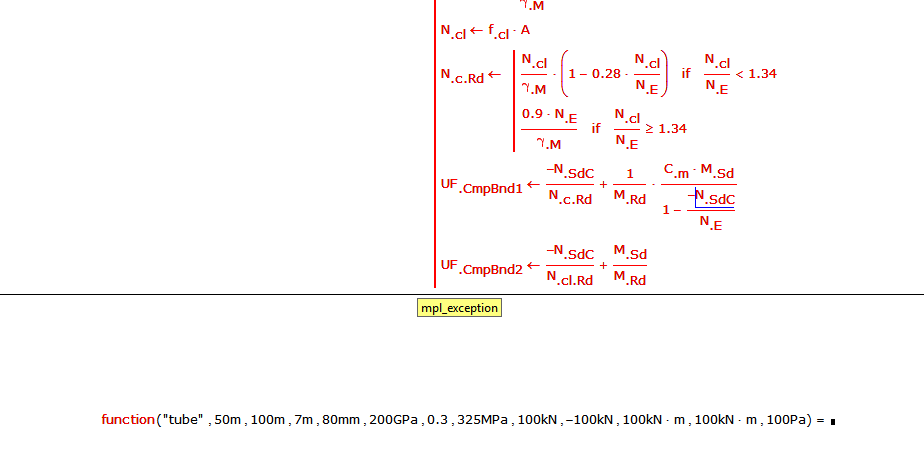
screenshot.PNG

When the program was shorter, i.e. when it had fewer formulae in it, then Mathcad was able to successfully calculate the program, and it returned a result in a very short time. Please note this program is not yet complete, and I still wish to add more formulae to it.

The program does not contain large loops, large arrays, or other operations that would understandably take a long time. I am confused as to why this program is taking so long to evaluate, and why it is not able to do so successfully. I would welcome your advice and assistance. Please find the Mathcad sheet attached to this post.

I am using Mathcad 15.0 (M020 [MC15_M020_20121127]) on a modern Windows 7 machine with reasonable specs.

Many thanks!

Best answer by StuartBruff

Leopold Turek wrote:

Try to change the fourth argument (D) in the vector S from 7 to 10.

Can anybody explain that error?

One problem I could imagine is, that the if statements should always cover all cases and therefore should be "closed" with an otherwise statement. This is not the case with many if statements in this program and some do not cover all possible cases.

The program uses no array anyway but I guess that the top statements which try to set the global worksheet variables ORIGIN and TOL will not have the desired effect - they have to be set outside the program.

LT

I haven't looked in detail at what's going on, but I'm guessing that the worksheet compiler is having problems with the nested if statements.

I started off by looking at the function a few lines at a time and quickly noticed that the time to compute was getting inordinately long.  I didn't understand why as there doesn't appear any array activity nor does there seem to be anything particuarly obscure about the functions or operators.  I added a simple timer to the function evaluation to check how long it took and was surprised when it reported almost no time at all when I'd been sitting there watching the screen for several million years.  However, pressing F9 showed that the function did subsequently evaluate quickly.  This seemed to point to the worksheet compiler taking the time rather than the actual evaluation.

My first thought was that the lack of otherwise statements might have contributed to the delay, but replacing one of the boundary case "if"s with "otherwise"s didn't help.  So the next obvious step was to make local functions of all of the nested if blocks.  This reduced the compilation time to something reasonable and seems to work ... I haven't checked that I've passed all of the correct arguments to the local functions, as that can safely be left as an exercise for the reader.

Stuart

1 reply

23-Emerald IV
July 23, 2015

The problem lies with:

and it's twofold. In the definition:

that precedes it (close to the start) you loose the dimension of either N.SdC or N.SdT. That can be corrected with:

The other problem is that you raise the ratio N.SdT/N.t.Rd to the power 1.75, and try to add the result to the ratio M.Sd/M.Red.Rd.

When calling the function, N.Sd gets a unit of kN, while M.Sd is in kN*m. Now kN^1.75 is not kN*m and essentially the units should drop out here because of the ratios. But Mathcad 15 insists on static unit checking and the units aren't clear up front. This is probably what sets Mathcad 15 going into erratic behaviour.

Success!

Luc

19-Tanzanite
July 24, 2015

I'm not sure your explanation is correct Luc.  If you put in a 'return UFTenBnd' immediately after it is calculated (UFTenBnd is the variable to which the ratio, raised to the power 1.75 and added to the other ratio, is assigned), the program runs and returns a value without a hitch!

I suggest the single long program is split into a few smaller ones.

Alan

cpearce1-VisitorAuthor
1-Visitor
July 24, 2015

Luc and Alan, thank you very much for your time.

Luc - I have incorporated your first suggestions regarding the definitions of N.Sd. I also tried dividing all the variables which define UF.TenBnd by their respective units, but this did not appear to resolve the problem.

Alan - I think you might be correct. As you mentioned, the program runs successfully when a "break" or "return" statement is placed immediately after UF.TenBnd. Also, I tried removing all units from the function's input arguments, so that the program was computing without any units whatsoever - Unfortunately this still results in the same error as I described in my original post.

You mention splitting the single program into smaller ones. Is there a known issue with long Mathcad programs? What is the reason for it failing to compute? The program may be reasonably long, but all the operations are mathematically simple. I would very much prefer to keep this all as a single program if possible.

Thanks again